View and reply to conversations in one place using the Wix Studio mobile app. Whether you have your own business site or you're a collaborator on a site managing communication, you can send a chat, email, or SMS.
Sending messages from your business site's inbox
Access your business site's inbox from the Home screen of your workspace so you never miss a message. You can choose to respond to your customers' needs using your preferred channel.
Before you begin:
Make sure you set your business site to the relevant workspace.
To send a message from your business site's inbox:
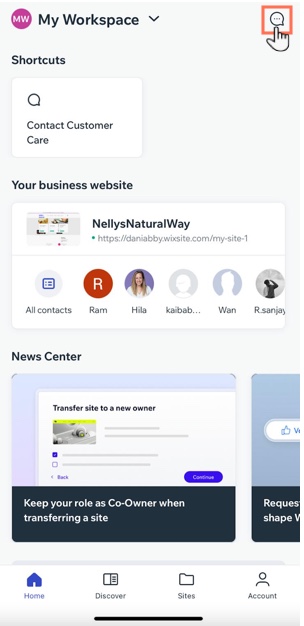
Go to your relevant workspace in the Studio app.
Tap Home

at the bottom.
Tap Inbox

at the top.
Tap on the relevant contact you want to message.
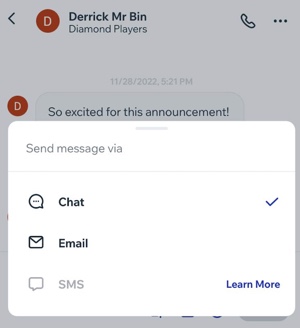
Tap the channel drop-down and select how you want to send your message:
Chat: Send a chat message to customers.To use this option, you must have the Wix Chat app on your site.
Email: Send an email to customers whose email addresses are saved in your contact list.
SMS: The SMS channel is available when you purchase a Business Phone Number and the member's number is saved in your contact list.
Note: You can't send SMS without saving a contact.
Sending messages from a site's inbox
You can access a site's inbox if you're the site owner or have the relevant role and permissions. For example, as 'Customer Relations Manager' for a site in an agency's workspace, you can use the inbox to communicate with their clients.
To send messages from a site's inbox:
Go to your relevant workspace in the Studio app.
Tap Sites

at the bottom.
Tap the relevant site.
Tap Inbox
.
Tap on the relevant contact you want to message.
Tap the channel drop-down and select how you want to send your message:
Chat: Send a chat message to customers.To use this option, you must have the Wix Chat app on your site.
Email: Send an email to customers whose email addresses are saved in your contact list.
SMS: The SMS channel is available when you purchase a Business Phone Number and the member's number is saved in your contact list.
Note: You can't send SMS without saving a contact.
FAQs
Click a question to learn more about sending messages from an inbox.
What other features can I use with the inbox?
Once you select how you want to send your message (e.g. chat or email), you can choose what you want to include from the following options:
Saved replies: Send saved replies to respond faster by saving the messages you send most often.
Share products and coupons: Increase sales by sending the right offers & items directly to your visitors.
Share files and images: Keep your customers and contacts up to date with invoices, designs or other documentation.
Request a payment: Send a payment request with a convenient payment link. Your contact can use their credit card or PayPal account to make this payment.
Can I give someone access to communicate using the inbox of a site?
Yes. For example, you can invite and assign a client the relevant role to manage their inbox while you work on their site. You can also create a custom role with this permission for your own business site so people can help manage the communication with your customers.
This article is credited to the Wix team - https://support.wix.com/ and we thank them for that!
