Add PayPal with Wix Payments as a payment method to help your customers pay quickly and securely using PayPal.
PayPal with Wix Payments allows you to manage PayPal payments along with all your other Wix Payments transactions from a single place in your Wix Payments dashboard. Payouts arrive in your bank account according to your chosen payout schedule. PayPal with Wix Payments also supports recurring payments.
Before you begin:
PayPal with Wix Payments is currently available only to select users in the United States.
You must set up Wix Payments to accept payments via PayPal with Wix Payments on your site.
If you wish to connect an existing PayPal account you can connect PayPal as a third-party payment provider.
General Info | |
Supported countries | United States |
Supported currencies | USD |
Supported payment options |
|
Processing fees | USA: From 3.49% of the transaction amount + 0.49 USD per transaction Learn more about Wix Payments service fees |
Support information | For help setting up or managing PayPal with Wix Payments, contact Wix Customer Care |
Information about PayPal payments |
|
Adding PayPal with Wix Payments
Go to Accept Payments in your site's dashboard.
Click Manage next to Wix Payments.
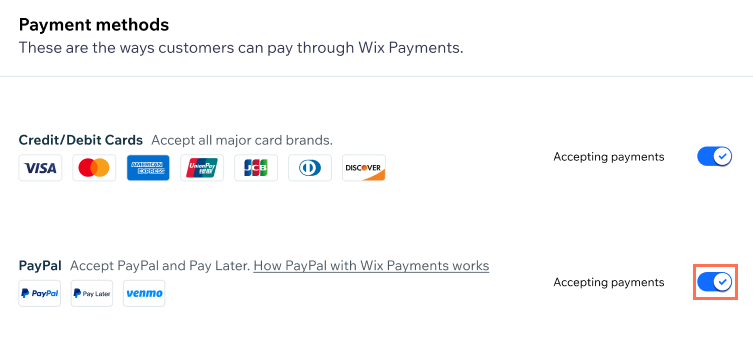
Enable the toggle next to PayPal.
Note: If you already have PayPal connected as a third party provider, you'll be asked to confirm disconnecting it in order to connect PayPal with Wix Payments.
FAQs
Click a question below to learn more about using PayPal with Wix Payments.
Do I need to create a new PayPal account to use PayPal with Wix Payments?
No. PayPal with Wix Payments is a feature of your Wix Payments account. There is no need to create a separate PayPal account.
I have an existing PayPal account. Can I connect this to Wix Payments?
No. PayPal with Wix Payments functions separately from your existing PayPal account. If you’re already accepting payments through PayPal on your site, you can switch to PayPal with Wix Payments, or keep PayPal as a third-party payment provider.
Where can I view my PayPal payments?
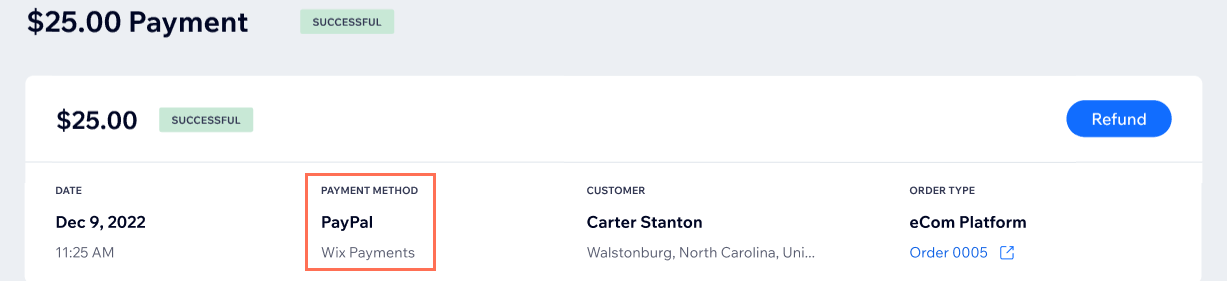
Go to Payments in your site's dashboard to view and manage your PayPal with Wix Payments transactions.
In the All payments section, you can see a list of all your payments received through any payment method or payment provider.
Learn more about managing your payments in Wix.
Where can view my payouts from Wix Payments?
View information about previous and upcoming payouts, as well as detailed information about each payment from the Payouts page in your Wix Payments dashboard.
Payouts are sent according to your chosen payout schedule, which can be daily, weekly or monthly.
Currently, all payouts from Wix Payments are sent to the bank account connected to your Wix Payments account, without the option to transfer the funds to your PayPal wallet instead. If this is something you’d like to see in the future, you can vote for that feature.
What is a payout schedule?
With Wix Payments, there are three payout schedules you can choose from, depending on the needs of your business:
Daily: Payouts are sent every day, including transactions that were made before the daily cut-off time. Any transactions received after that time will be included in the next day's payout.
Weekly: Payouts are sent every Monday. You can change this to any other day of the week through your account settings.
Monthly: Payouts are sent on the 1st of every month. You can change this to any other day of the month through your account settings. In months with less than 29 days, payouts are sent on the last day of the month.
Can I change my payout schedule?
Yes. You can update your payout schedule at any time from your Wix Payments account settings. Whichever schedule you select will apply to all your Wix Payments payment methods.
To update your payout schedule:
Go to Manage Wix Payments in your site's dashboard.
Scroll down to Payout schedule.
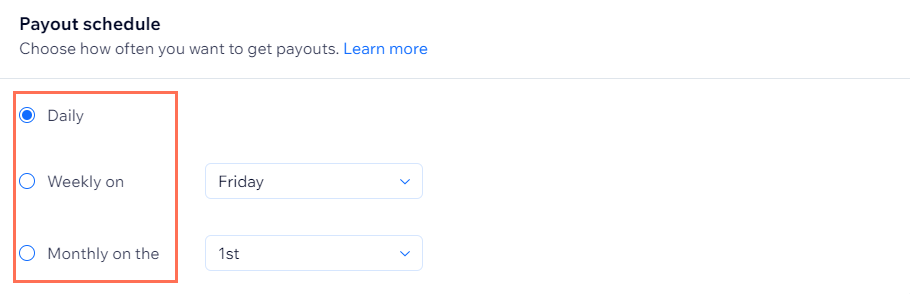
Select the checkbox next to the relevant option:
Daily
Weekly
Use the drop-down menu to select a day.
Monthly
Use the drop-down menu to select a date.
Click Save.
Can I get PayPal payments sent to my PayPal account instead of my bank account?
Yes. In order to receive PayPal payments to your PayPal account, you'll need to connect to PayPal as a third-party provider to process your PayPal payments. This requires a new or existing PayPal account.
Learn how to connect PayPal as a third party provider.
Can I disable PayPal as a payment method on checkout?
Yes. You can disable the toggle at any time to remove PayPal with Wix Payments from your payment options at checkout.
I already have PayPal connected as a third-party provider. Can I switch to PayPal with Wix Payments?
Yes. If you already have PayPal connected as a third-party provider, you can connect PayPal with Wix Payments to switch your PayPal payments to Wix Payments.

Please note that historical transactions are not transferred from your original PayPal account to your Wix Payments account.
If you have active payments such as subscriptions or chargebacks open in your original account, they continue to be managed from there.
Can I switch back to my original PayPal account version after switching?
Yes. You can switch from PayPal as a third-party payment provider to PayPal with Wix Payments, and back again if you wish.
Is PayPal Seller Protection available with PayPal with Wix Payments?
Yes. PayPal Seller Protection is available on transactions that qualify for it.
This article is credited to the Wix team - https://support.wix.com/ and we thank them for that!
