You can set your header to remain on top of the page when your visitors scroll down. This allows your site visitors to easily access your site menu without scrolling back to the top.
To create a fixed menu:
Place your menu in your header.
Click the header.
Click the More Actions icon

.
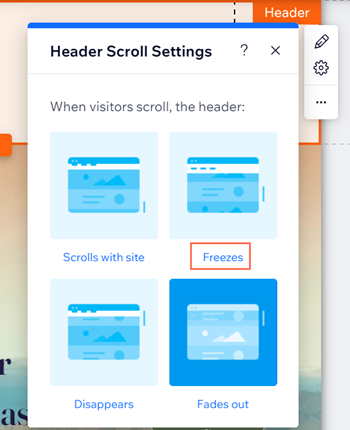
Click Header Scroll Settings.
Select Freezes.
Tips:
We recommend keeping the height of your header small so it doesn't cover any element or content when visitors scroll through your site.
You can also pin your menu to the top of your site by right clicking on your menu and selecting Pin to Screen. Freezing keeps the header always visible at the top, while pinning fixes it at a specific point as you scroll.
This article is credited to the Wix team - https://support.wix.com/ and we thank them for that!
