See who's currently on your site and initiate chats directly from your site's dashboard. This is a great way to keep your visitors engaged and turn them into meaningful business leads. You can also view live site visitors' activity including where they're browsing from and what site page they're on.
Before you begin:
To view visitor activity and initiate chats, you must first install Wix Chat on your site.
Viewing and chatting with live site visitors
See who's browsing your site in real time and chat with live visitors directly from your site's dashboard using Wix Inbox.
To view and chat with your visitors:
Note: This feature is available from any section of your dashboard.
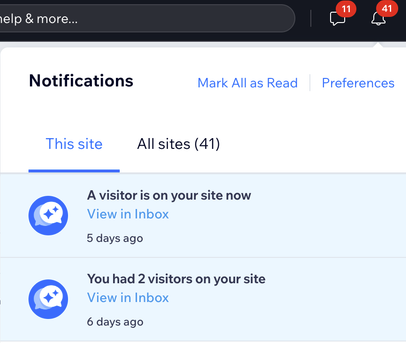
Click the Notifications icon

at the top right. All current site visitors are displayed in the pop-up window. If there was more than 1 visitor on your site, you see the number of visitors in one notification.
Click View in Inbox to see your visitors and open a new inbox message.
Note:
If a live site visitor has provided info in the past (e.g. filled out a contact form) their name appears. If they haven't provided any information, they appear as 'A visitor'.
From Wix Inbox, choose what you want to do:
Chat with the visitor
Type your message in the text box.
Click Send at the bottom right.
Note: To chat with live site visitors, your chat status needs to be 'online' and within the designated chat hours added to your chat settings. To check your chat status and hours:
Click the Settings drop-down at the top right of your inbox.
Enable the Chat Status toggle.
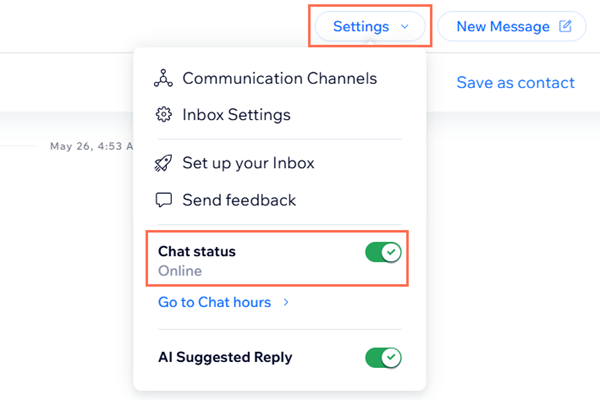
Click Go to Chat hours.
View the visitor's site activity
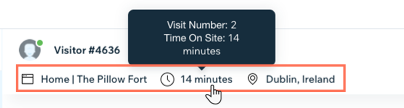
At the top of the inbox message you can see all available information about the site visitor including:
The site page they're viewing
The type of device they're using
Note: Hover over the site page to view the device type
How long they've been on your site
The number of times they've visited your site
Note: Hover over the site time to see visit number
Their location
FAQs
Click a question below to learn more about viewing and chatting with live site visitors.
Can I view and chat with live site visitors from the Wix app?
Yes, you can also view and chat with live visitors from the Wix app.
What if I miss a chat from a live site visitor?
If you miss a chat, it will be saved in your inbox so you can respond to it later. Make sure you enable desktop notifications so you're alerted when a new message comes in.
Can multiple team members chat with site visitors?
Yes, multiple team members can chat with site visitors. Make sure each team member has a role that grants access to Wix Chat.
Why does I see "Add email to message visitor" when I try to message an anonymous site visitor?
You can only chat with anonymous visitors while they're active on your site (i.e. you see a green dot next to their profile). When an anonymous visitor leaves your website before providing their email address, the chat session ends, and you won't be able to reply.
To prevent this, you can set up a mandatory pre-chat form to collect their email upfront. Learn how to add a pre-chat form to your chat.
This article is credited to the Wix team - https://support.wix.com/ and we thank them for that!
