Here are some commonly asked questions about Wix Analytics.
Tip:
You can also ask questions about your data in Analytics Pro and get answers with charts.
General Wix Analytics FAQs
Can I access Wix Analytics on my mobile device?
Yes, you can check Wix Analytics overviews, reports, and pages on the go with the Wix app or Wix Studio app.
Wix app:
Go to your site in the Wix app.
Tap Analytics

at the bottom.
Scroll down to the relevant section.
Wix Studio app:
Go to your site in the Wix Studio app.
Tap Manage.
Tap Analytics and select the relevant page.
Note: Online programs reports are only available in your site's dashboard.
Where can I learn more about the terminology used in Wix Analytics?
Every Wix Analytics report includes a glossary where you can learn more about the terms used in the report. To access a report's glossary:
Go to Reports in your site's dashboard.
Click on the report you want to learn more about.
Click View report definitions under the report title.
Is my data updated in real time?
No. Data is updated one hour after an event occurs. For example, if you received an online order or got a new site visitor, the information is reflected in the relevant report one hour later.
How can I export my analytics data?
You can download reports (including their customized view) in CSV format. If you want to export reports on a regular basis, you can subscribe to a report.
Can I track clicks on specific site buttons and links?
Yes, you can now track visitor clicks on your site buttons and links with 2 new Wix Analytics Behavior reports: Button Clicks and Button Clicks over time. Learn more Wix Analytics Behavior reports.
Can I see data for the different site language versions in Wix Analytics?
Currently, it is not possible to show data for different language versions of the site.
Can the site’s collaborator/contributor see a shared report?
By default, pre-built Analytics reports are visible to all site collaborators with permission to view Analytics data. Newly created or duplicated custom reports are only visible to the creator and site owner, unless they are shared with others. Learn more about sharing reports.
Why is the Analytics tab not appearing on my site's dashboard?
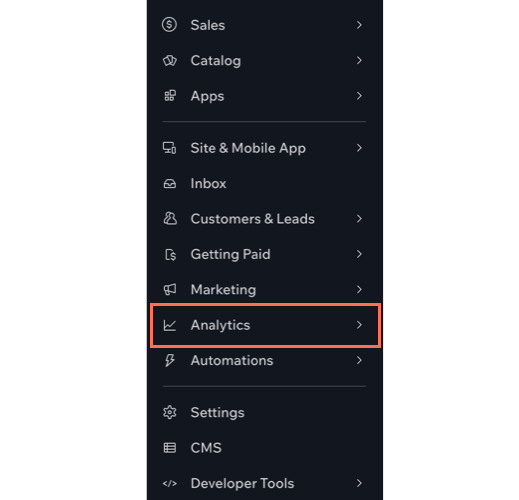
If you aren't seeing the Analytics tab on the left-side menu in your site's dashboard, check if your account was given the right permission to view site analytics under Roles & Permissions.
Is it possible to view analytics for all the sites in an account at once?
To view analytics for all your sites in one account, you need to use the Wix Studio enterprise solution. This feature is specifically designed for users managing multiple sites under one account.
The enterprise solution gives you access to the Analytics Overview, which allows you to see data summaries for all your sites, explore overall performance, and customize your dashboard to keep track of the data you're most interested in.
Why is no data showing in any of my Wix Analytics reports?
It is possible that your site or domain was moved out of Wix. Wix Analytics data only shows up for sites with domains that are currently connected to Wix.
Why do I still see Analytics data for a deleted site page?
Wix Analytics stores historical data, so data for deleted pages are not removed from reports. This means that you will see data for a deleted page if the selected time frame for the report includes dates before the page was deleted.
Tip: If you only want to see data for your current pages, adjust the report’s time frame to dates after you deleted site pages.
Site traffic FAQs
How can I track where my site traffic is coming from?
Wix Analytics has extensive traffic reports as well as a Traffic Overview to give you a clear view of who is visiting your site as well as where they are coming from. View traffic by time of day, location, device, as well as new and returning customers. Learn more about traffic reports.
Why do I still see traffic data for a deleted site page?
Historical data is stored in Wix Analytics. If you see traffic data for a deleted page, this is aggregated data that includes the dates when the page was still published.
Why is Time on Page showing 00 seconds?
This happens when the page was the very last page viewed in visitor's site session. This is because time on page is calculated by looking at the gap between a site visitor's current page and the next page they view in the site session.
For example, if a site visitor entered Page A at 05:10:00, and then went to page B at 05:10:25, their time on Page A is 25 seconds. If they view page B and then move away from your site, the time on Page B is 00 as there is no timestamp for the next page they visited.
Data discrepancy FAQs
Why is data missing from my report?
Data is updated one hour after an event occurs on site, and Wix Analytics reports usually update automatically. Sometimes, you might need to refresh the report by clicking the refresh button above the report, in order to update your data manually.
Why do I see data gaps between Wix Analytics & Facebook / Google Analytics?
If you are using tracking tools, such as Google Ads, Google Analytics, or Facebook Ads, you may find there are differences in your data. Learn more about why you are seeing discrepancies depending on the app you are using.
Why is there is a data discrepancy between Email Marketing and Wix Analytics?
If Wix Analytics reports show fewer visitors than the number of clicks in the Wix Email Marketing campaign, it could be due to the following reasons:
Email Marketing reports show the number of clicks. In Wix Analytics, a site session is all the actions performed by a visitor and ends after 30 minutes of inactivity.
When comparing clicks to site sessions, it is possible to see a difference between the data. This is because the same visitor can click the email campaign links more than once during a session. Also, not all clicks will result in the site page loading.
If the site has a cookie consent banner, Wix Analytics data can only be collected from visitors who have clicked "Accept”. This means it's possible that not all the clicks of the email marketing campaign will be reflected in the Wix Analytics reports.
Some browser settings might prevent the collection of data, also resulting for the data to not be collected by Wix Analytics.
Why is there a data discrepancy between Visitor Notifications and Wix Analytics?
If you are seeing multiple push visitor notifications in the Wix mobile app but you are seeing a lower number of visitors in the Traffic reports, it could be due to the following reasons:
(If your site has a Cookie Banner enabled) Since your site has a Cookie Banner, traffic data won't be collected unless your site visitors accept the cookies. A Cookie Consent message appears in the Wix app as well.
Wix Analytics measures only unique visitors & sessions, while in the Wix mobile app notifications are pushed every time someone accesses the site.
Wix Analytics andWix Chat both push live site visitor notifications to the Wix mobile app, but they use different bot filtering algorithms. You can check what bots and in what amount hit your site in the Bot Traffic over Time report.
If you are logged in to your Wix account, any of your visits using the same device & browser to your own sites won't be counted in traffic and conversion reports. You can find more details here.
Tip: You can check if traffic is getting tracked in Wix Analytics by accessing your site in Incognito mode or being logged out of your Wix account. Make sure to accept the cookies if you have a cookie banner enabled on your site. Then, check the Real-time Analytics page.
Why do I see discrepancies between data in the Orders widget and the Orders table?
In the Orders tab, you may notice discrepancies between the widget at the top of the page and the table below it due to the following reasons:
Gift card purchases are not included in the widget. The sales value updates only when the gift card is redeemed. For example, an order for a $50 gift card will be listed in the table but will only be included in the widget when redeemed.
The orders table displays sales in the original currency used for each order. If your site uses multiple currencies, the widget will show the total sales after converting all currencies to your site's main currency.
Tip: If you sell in multiple currencies, access your Sales by Currency report to view your sales by each currency.

Sales and payment FAQs
How can I learn more about my sales (sold items details, tax, customer details)?
You can learn more about your sales by going to your sales reports or visiting your Sales Overview to get a deeper understanding of your customers' spending trends.
Why do I see bookings that haven't been paid in Wix Analytics reports?
In Wix Analytics all bookings are tracked from the moment they are placed on your site. This includes all payment methods, including in-person payments.
You can locate clients who owe you money using the Clients with Overdue Payments report.
Is it possible to remove test orders from sales reports?
It is not possible to remove data from Wix Analytics. However, if you cancel an order, it will be removed from your Sales reports. To cancel an order you must:
Cancel it in the Orders tab
Cancel it in your Bookings calendar
Please allow one hour for your reports to update.
Note: Canceled orders and bookings are displayed in the Bookings reports with canceled statuses.
Why do my payouts differ from what I see in Wix Analytics?
Your actual payouts may be different from what you see in Wix Analytics or Settlement reports due to several reasons:
While your settlement report only includes transactions made with Wix Payments, Wix Analytics collects information about sales from all payment methods set up on your site (i.e. Wix Payments or any other credit card payment provider, PayPal, manual and in-person payments).
Wix Analytics tracks all orders and bookings once they are placed on your site, regardless of their payment status. Payouts can only be made from orders and bookings that were paid for online.
The sales numbers (e.g. Total Sales, Net Revenue) that you see in the Sales reports are based on the order date. If you need the sales data to be based on the actual payment date and not the order date, you should refer to the Payments Summary report.
Tip: You can add the Payment method column to the Payments Summary report to check payment volume breakdown by different payment methods (e.g. credit card, in-person).
Learn more about Wix Payments payouts.
What happens to my sales and sales data if I change my site currency?
If you update the currency on your site (e.g. from USD to EUR) your sales go through a conversion process. Wix converts sales data in the past using the exchange rate for the previous day.
Let's say you set your site currency to USD in March, but changed it to EUR in April. An order that was made in USD on March 12th is converted to EUR using the exchange rate from the previous day (March 11th).
All sales made in the last year will be converted accordingly. Please note that even if the exchange rate from one year ago is drastically different than today, the process uses the conversion rate of the day before the order was made, not today's conversion rate.
Notes:
This conversion process is implemented on the day after you switch site currency. On the day of the change, sales data won’t be adjusted yet.
If you've set up any alerts for sales only the currency symbol is updated, not the alert threshold itself. For example, if you set an alert to warn you of sales below 100 USD, the alert now switches to sales below 100 EUR.
Tax reporting FAQs
Where can I find a tax report for my sales?
If your site has Wix Bookings, Wix Stores, or Wix Restaurants (New), you can use the Tax Summary report, found on the All Reports page. If your site has sales from other apps, you can add a Tax column to Sales reports or Restaurants (Old) reports.
Notes:
To view your tax reports, make sure you have set up taxes in the relevant Wix apps.
Tip:Learn how to set it up for Wix Bookings, Wix Stores, Wix Restaurants (New), Pricing Plans, and Wix Events.
Some Wix apps (e.g. Wix Bookings, Wix Restaurants) do not support taxes if based outside of the U.S and Canada.
Is it possible to display tax by jurisdiction?
If you're using the Tax Summary report, you can add the Tax location column to the report. Learn how to set up tax locations in your site's dashboard settings.
Note: Jurisdiction data is not yet supported in this report, unless you are using Avalara.
You can also use the Sales by Billing Location report to display tax by jurisdiction. Alternatively, add Tax and Billing region metrics to any Sales reports or Accounting reports.
This article is credited to the Wix team - https://support.wix.com/ and we thank them for that!
