With Wix Analytics traffic reports you can find out how visitors find and navigate around your site. Drill down into your reports to answer questions like "How many people visited my site through a marketing email in the last 30 days?"
Analyze your site traffic over time or during a specific time of the day. You can also see which locations, devices, and site pages are bringing the most viewers to your site.
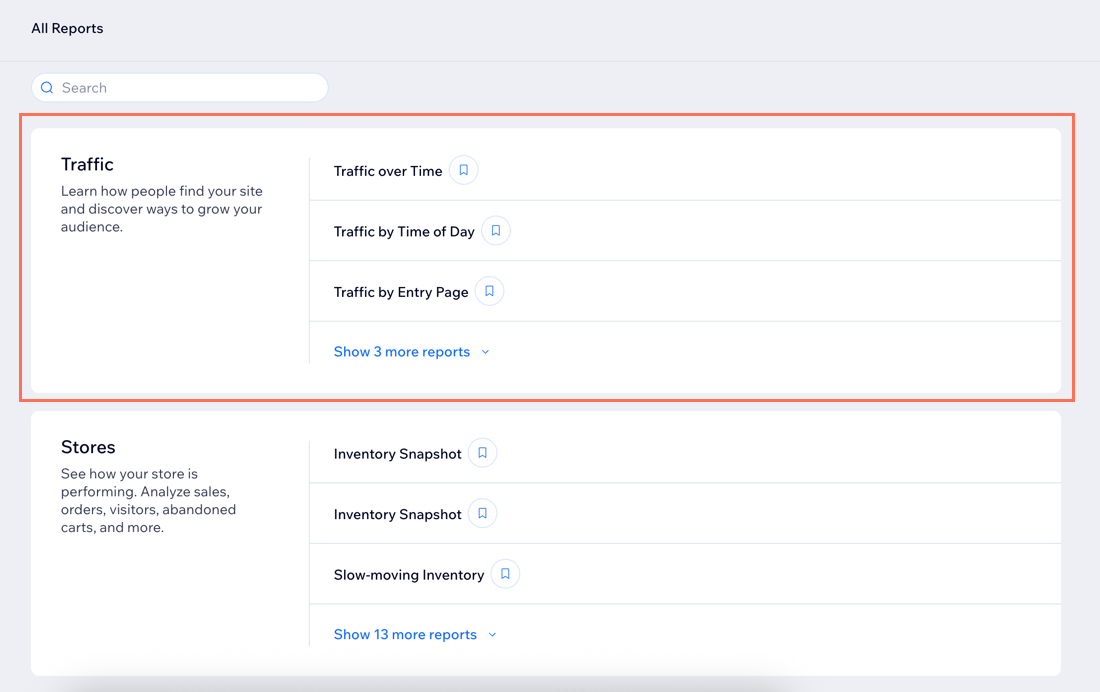
How to access your traffic reports:
Go to All Reports in your site's dashboard and view the reports in the Traffic section. You can also check out the Traffic Overview to learn more about your site's traffic metrics and identify trends.
Types of traffic reports
Learn more about your site traffic using the reports available in Wix Analytics. Access detailed reports that show you trends about your site visitors and get data such as where they go on your site, which devices they visit from, and more.
Click a report type to learn more about it.
Traffic over Time
Learn which days or months get the most traffic on your site. Use this report to identify trends in traffic over different time periods.
Traffic by Location
See where in the world you are getting the most traffic. You can filter the information by country map or city map.
Use this report to:
Optimize your marketing efforts or paid campaigns to the locations where you are getting more traffic.
Prioritize locations where you want to increase your marketing presence.
Note on location accuracy: We are working on improving the accuracy of traffic by location reports. In isolated cases, you may see inaccurate city names, or ‘N/A’ where the information from IP addresses is untrusted or unknown. Site traffic received through VPN, anonymizers, cloud providers, and bots can affect the accuracy of this data.
Traffic by Time of Day
See which time of the day is most active for site visitors. The heat map displays the hours people are most visiting your site. The darker the color, the more people are viewing
Tip: If you have Wix Chat on your site or are deciding on business hours, use the data in this report to make sure you are available during peak periods.
Traffic by Entry Page
See which site page visitors land on first when entering your site.
Tip: Make sure the most important call-to-actions are visible on the pages that visitors are landing on the most.
Traffic by Device
See if people are viewing your site from desktop, tablet, or mobile.
Use this report to:
Make sure your site on mobile is up-to-date and functions for your mobile visitors.
Create offers and content that are targeted to specific devices.
New vs. Returning Visitors
See how much site traffic comes from new visitors vs. visitors who have viewed your site before. You can use this report to tailor marketing activities and promotions to visitors at different stages.
FAQs
Click a question below to learn more about Wix Analytics traffic reports.
What is a traffic category vs. a traffic source?
A traffic category refers to the broader category where traffic is coming from (e.g. paid social traffic vs. organic social traffic). A traffic source is the specific site where traffic came from (e.g. Facebook.com, Google.com).
How do I filter my own visits from traffic reports?
If you are logged into your Wix account, any visits you make to your own site using the same device and browser won't be counted in traffic reports.
You can also exclude a specific IP address from your traffic reports:
Open any traffic report (e.g. Traffic over Time).
Click Filter.
Select IP address.
Select the checkboxes for the IP addresses you want to include. For example, deselect your own IP address to leave it out.
Click Apply.
Note: Other metrics outside traffic reports (e.g. store orders, event RSVPs, post likes and comments) still include your interaction(s) as the site owner. For example, the number of times you view a blog post is still counted in the total post views.
What does a 'direct' source mean in traffic reports?
Traffic is attributed to a 'Direct' source in the following cases:
A site visitor accessed the site directly using your site's URL or from a bookmarked URL, and not from a paid search, organic search, or a promotion.
Traffic coming from a redirect (e.g. when domain1.com redirects to domain2.com). Visits from the redirected domain are attributed to the Direct source.
Traffic coming from a redirect from http to https. This may happen if you set up your site as "http:[your site domain]" in Google Ads or Facebook Ads.
Traffic from 'dark social': visits that come from private or hard-to-track channels, such as links shared in messaging apps (e.g. WhatsApp, Messenger) or private emails, where Wix Analytics cannot see the original source.
Traffic coming from generated QR codes.
Why do I see 'null' values in the Traffic by Location report?
You'll see null values (displayed as a Ø symbol) in some fields in the Traffic by Location report when a site visitor only views a single page in their session, without viewing another page before or after it.
Metrics such as 'Average time on page' and 'Average session duration' are based on the time between one page view and the next. If a visitor stays on just one page and does not move to another page, there is no page change to use as a "trigger," so these metrics cannot be calculated and thus appear as Ø.
If you add more metrics to the report, such as 'Previous page viewed' or 'Next page viewed', you'll see that "unknown" is displayed in these columns.
Why is there a discrepancy between the number of visitors in the Wix app/Wix Studio app and in Traffic reports?
If you're seeing a lower amount of site visitors in Traffic reports compared to the number of push notifications you're receiving about site visitors in the Wix app or Wix Studio app it could be due to the following reasons:
If your site has a cookie banner enabled, traffic data won't be collected unless site visitors accept the cookies.
On the Wix app/Wix Studio app, notifications are pushed every time someone goes to your site. This means that the same visitor (with the same IP address) could access your site multiple times and you'll get a notification each time. In contrast, Wix Analytics measures only unique visitors and sessions, so those multiple visits count as 1 unique visitor and 1 session.
Wix Analytics and Wix Chat (that pushes live site visitor notifications to your mobile app) use different bot filtering algorithms.
Tip: You can check which bots crawl your site in the Bot Traffic over Time report.
If you (as the site owner) are logged into your Wix account, any visits to your own sites, using the same device and browser, won't be counted in traffic and conversion reports.
You can check if traffic is correctly tracked in Wix Analytics in real-time by:
Accessing the site in Incognito mode or logging out of your Wix account.
Accepting cookies if you have a cookie banner enabled on your site.
Checking the Real-time Analytics page.
This article is credited to the Wix team - https://support.wix.com/ and we thank them for that!
