Wix Analytics Behavior reports show you how people are navigating through your site and what actions they are taking.
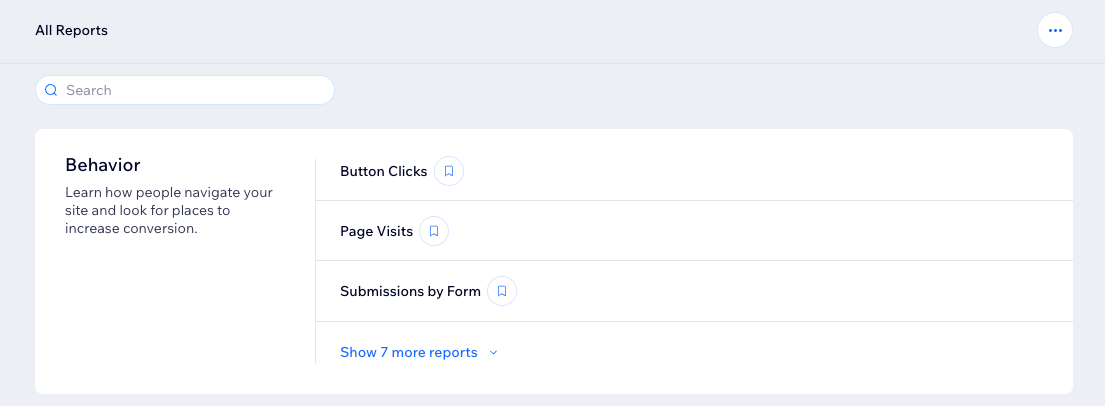
Discover how each page of your site performs by reviewing metrics such as page visits, submissions by form, as well as how your order conversions are tracking over time.
You can also see what buttons on your site are clicked the most, the pages or URLs they lead to, and how clicking behavior changes over time with site visitors.
How to access your behavior reports:
Go to All Reports in your site's dashboard and scroll down to the Behavior section. You can also check out the Behavior Overview to view all the key metrics for your business.
Notes:
Only sites using Wix Site Search will show data in the search reports such as top searches, searches over time, and searches with no results.
When you log in to your Wix account, any visits using the same device & browser to your own site won't be counted in the conversion or search reports.
Types of behavior reports
Understand how visitors interact with your site through different types of behavior reports in Wix Analytics.
Click a report type to learn more about it.
Button Clicks
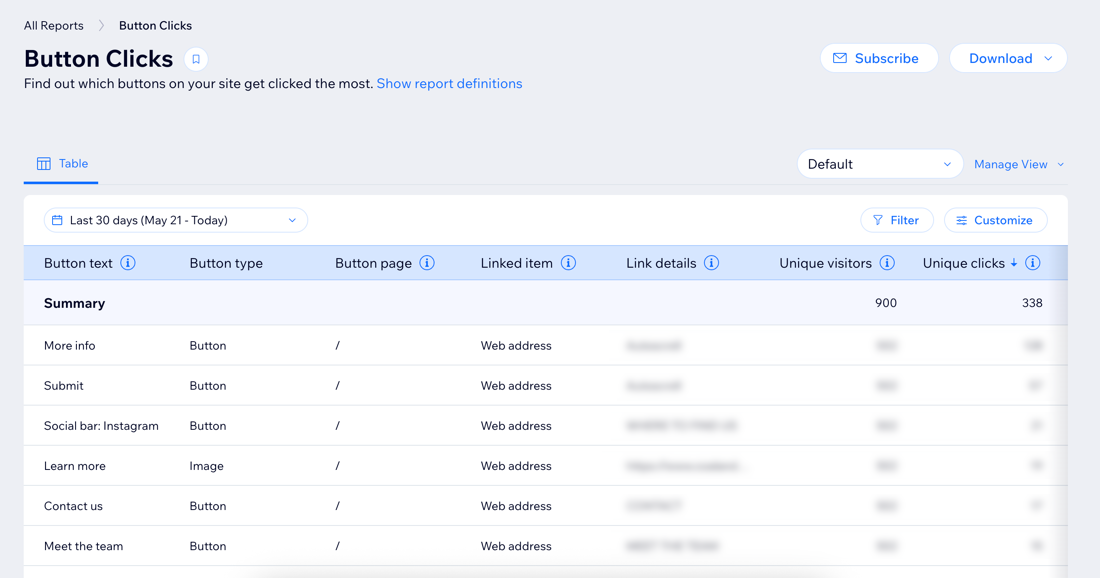
Use the button clicks report to find out which buttons, links and images are clicked the most on your site. When you first navigate to this report, click Enable Click Tracking to begin.
Note: Site visitors must also accept the site's cookies in order for data to be tracked.
Use this report to:
See what elements on your site are clicked the most
Track unique clicks, total clicks and the button's CTR (click-through-rate)
What types of clicks are tracked in this report?
This report tracks clicks on buttons, links, clickable images, expandable text, and more. You can see each element's details (e.g. button text, button type) under the relevant column in the table.
Page Visits
This report helps you understand how each page of your site is performing. Each page of your site is ranked based on a specific measure. The default measure is site sessions.
Use this report to:
Filter site pages by specific metrics (site sessions, bounce rate, average time on a page).
Optimize the content of each site page based on the performance.
Submissions by Form
View the number of submissions received on your site per individual form.
Use this report to:
See which forms on your site are the most popular.
Track how many submissions each form received over specific time periods.
Top Searches
Find out what your site visitors are searching for most on your site as well as the click-through-rate of that term and its total searches.
Use this report to:
Make sure the search terms that are most popular are relevant to your site and/or business.
Promote your site’s content based on the search terms. For example, offer coupons on products that contain your most searched terms.
Consider including the most searched terms in your SEO strategy by using them as keywords.
Order Conversion over time
Analyze how your site traffic and orders have increased or decreased during specific periods.
Use this report to:
Find out your order conversion rate percentage over time.
Learn how changes in site sessions impacts your total orders.
Clicks-to-Contact over Time
See what contact channels are most popular with your visitors between WhatsApp, phone, and email.
You can use this report to:
Find out which channels your site visitors prefer.
Sort the data by device type to see what device is most preferred by visitors.
Update your marketing activities and/or content based on the preferred contact method.
Note: This report does not include click data on Wix Business Phone Numbers. You can track these calls from your inbox.
Searches over Time
Find out what your site visitors are searching over a specific period of time and identify search trends.
Use this report to:
Discover how many people searched your site as well as what they were searching for.
See how many searches on your site had no results.
Find out how often people click on search results, and how relevant these results are.
Searches with No Results
Find out what elements on your site visitors couldn't find when searching. See different search terms that didn't show your site on results and optimize your site pages, blog posts, and products accordingly.
Form Submissions over Time
See how many people have filled out form submissions on your site over a specific period of time.
Use this report to:
Filter by form to see which forms get the most submissions.
See how any custom forms are performing over time.
Compare present form submission metrics to last year or a previous time period.
Button Clicks over Time
Use the button clicks over time report to track site visitor button clicks over a specific time period. See what buttons or clickable images on your site are performing best and how it changes over time.
Use this report to:
Track changes in clicking behavior over time.
Update your marketing strategy and test different buttons on different pages to see how interactions change over time.
Note: Site visitors must accept the site's cookies in order for data to be tracked.
FAQs
Click a question to learn more about the Wix Analytics behavior reports.
Why can't I see any data in any of the search reports?
You must have Wix Site Search on your site to see data for the search reports including top searches, searches over time, and searches with no results.
Why aren’t some buttons showing in the Button Clicks report?
Some buttons may not appear in the Button Clicks report (under the Button details column) for the following reasons:
You need to click Enable Click Tracking to begin collecting data.
Buttons need to receive at least one unique click to show up in the report. Try choosing a wider time frame to see if there was an interaction with the button in other time periods.
Site visitors must also accept your site's cookies for their data to be tracked.
Are 301 redirects shown in the Page visits report?
Yes, traffic that goes through a 301 redirect is tracked in the 'Page visits' report. When someone visits a URL that redirects to another page, that data can appear in columns like Page path or Last page viewed.
For example: If "/storepage" redirects to your homepage, data is tracked for /storepage as the Page path and is detected as direct traffic. When checking the traffic page path "/" to the homepage, /storepage will also be shown as the 'Last page viewed'.
This article is credited to the Wix team - https://support.wix.com/ and we thank them for that!
