You can add Wix Forms to your site to receive explicit consent from your site visitors before processing their data.
Important:
In many countries, consent is required before customer data can be processed. Learn more about preparing your site for the GDPR and the CCPA.
Step 1 | Adding and setting up your form
Using Wix Forms you can add a form to your site to collect information from your visitors. You can set up and design your form to match your site's style.
Wix Editor
Click Add

on the left side of the editor.
Click Contact & Forms.
Scroll through the available form templates and drag the one you want onto your site.
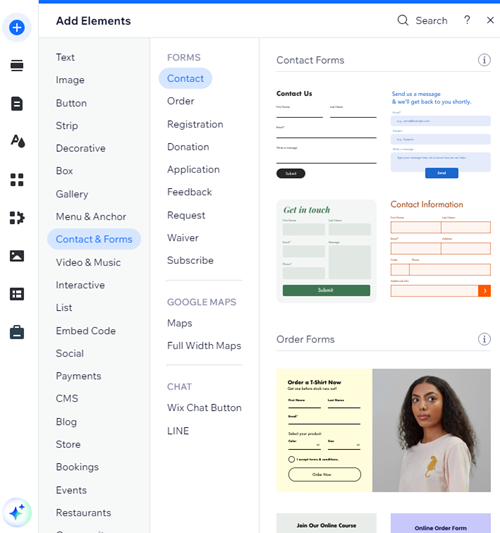
Click Edit Form.
Click Settings and add a form name to your form.
Wix Studio
Click Add Elements

on the left side of the editor.
Click Contact & Forms.
Click Create New Form orselect a form from the premade templatesand drag the form element onto the page.
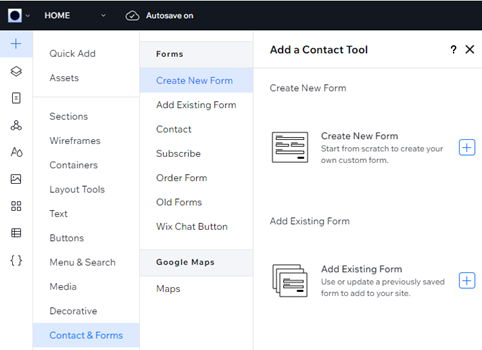
Click Edit Form.
Click Settings and add a form name to your form.
Step 2 | Adding an explicit consent checkbox
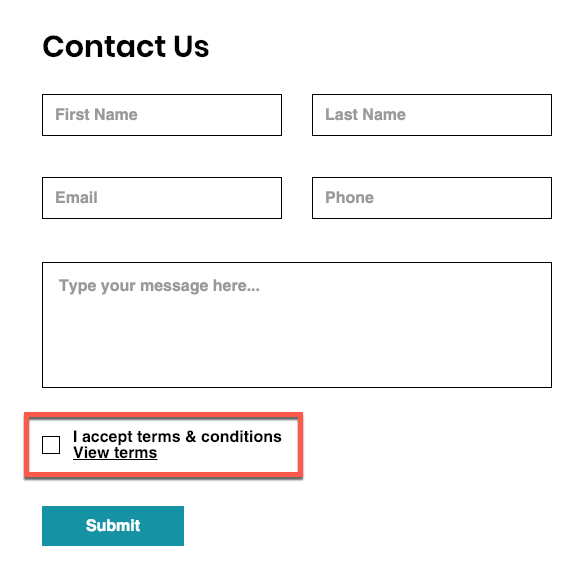
You can receive explicit consent by adding a "Terms of Use" checkbox to your form. Visitors are required to select the checkbox before they can click Submit. Add a link to your " Terms of Use" page so that visitors can read them.
Click the form in your editor.
Click Edit Form.
Under Add form fields, click Checkbox.
Click the checkbox in your editor and edit the following:
Add a Field message: This is the text that appears next to the checkbox (e.g., I accept the terms & conditions).
Add a Link: Edit the link text and click the Link icon

to choose your Terms of Use link page.
Enable the Required toggle: Choose whether this is a required field or not. If you require explicit consent before your visitor clicks Submit, enable the Required toggle.
Tips:
Click the form in your editor and click Settings. Use the Layout

and Design

icons to change the way your formlooks (size, colors, fonts etc.).
You can connect your Wix Form to your contacts.
This article is credited to the Wix team - https://support.wix.com/ and we thank them for that!
