Important:
This feature is not yet available in all regions.
Purchase a Premium plan or Studio plan to gain benefits such as the ability to connect a customized domain to your site, remove Wix ads, create and connect a personalized business email, and to receive additional storage.
You can purchase a plan using PayPal, an online payment system that adds an extra layer of security to your online transactions. It enables you to securely pay for products and services, send money, and accept payments. To use PayPal, select the PayPal option at the checkout and complete your purchase on the PayPal website.
To use PayPal to purchase a plan:
Note: If you have multiple sites, select the site you want to upgrade.
Click Select under the plan you want to purchase.
Choose your subscription cycle and click Select.
Click Buy Now.
Select PayPal from the list of options in the Wix checkout.
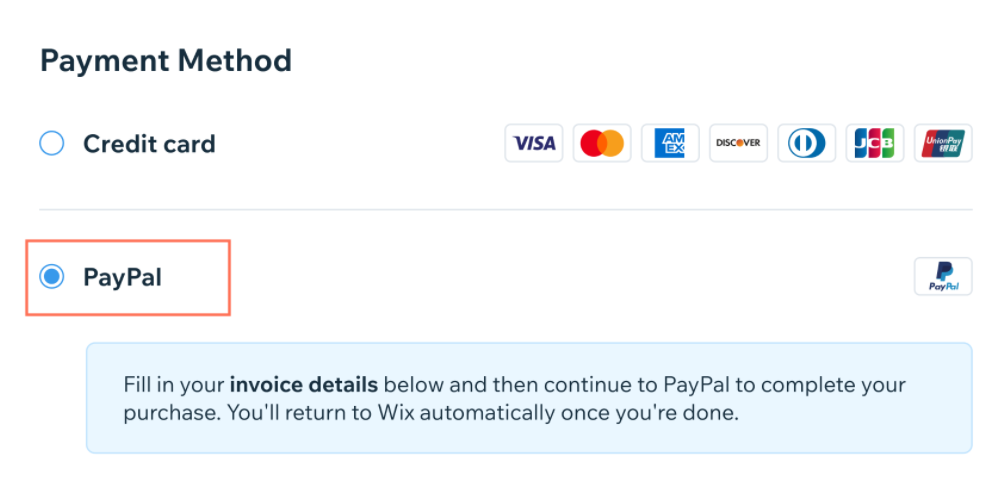
Fill in your invoice details in the form below the PayPal option, then click Continue to PayPal. This brings you to the PayPal website to log into your PayPal account.
Note: If you do not have a PayPal account, you can choose to set one up at this point.
In your PayPal account, choose a card to pay with, then click Agree and Pay Now.
Note: You will then be brought back to your Wix account and a message will appear confirming your payment.
Important
You cannot update your PayPal account preferences from the Wix checkout. You must go to PayPal to update your PayPal preferences - e.g., to choose a different preferred payment method.
If you have a declined charge on a subscription that you originally paid for with PayPal, you must use the card payment option within your account to pay the amount due.
This article is credited to the Wix team - https://support.wix.com/ and we thank them for that!
