You can update the invoice details for any of your Wix subscriptions in the Billing History section of your account. The changes you make apply to both current and future invoices for Wix services.
Important:
You can make changes to any of the fields (address, country, tax ID etc.) These changes will apply to all future invoices. However, for legal reasons and depending on local tax laws, some changes only apply to future invoices and will not appear on your current invoices:
All countries: Country cannot be changed.
European Union: VAT ID and Country cannot be changed.
United States: Postal Code, State and Country cannot be changed.
Singapore: GST and Country cannot be changed.
Updating your invoice details
Edit the invoice details for any of the premium subscriptions in your Wix account.
Note:
Updating your invoice details also updates the details of the payment method associated with your subscription. Your changes will apply to any other Wix subscriptions which use the same payment method. Learn more about managing your payment methods for Wix services.
To update your invoice details:
Go to Billing History in your Wix account.
Click the More Actions icon

nextto the subscription you want to update the invoice for.
Click Update invoice details.
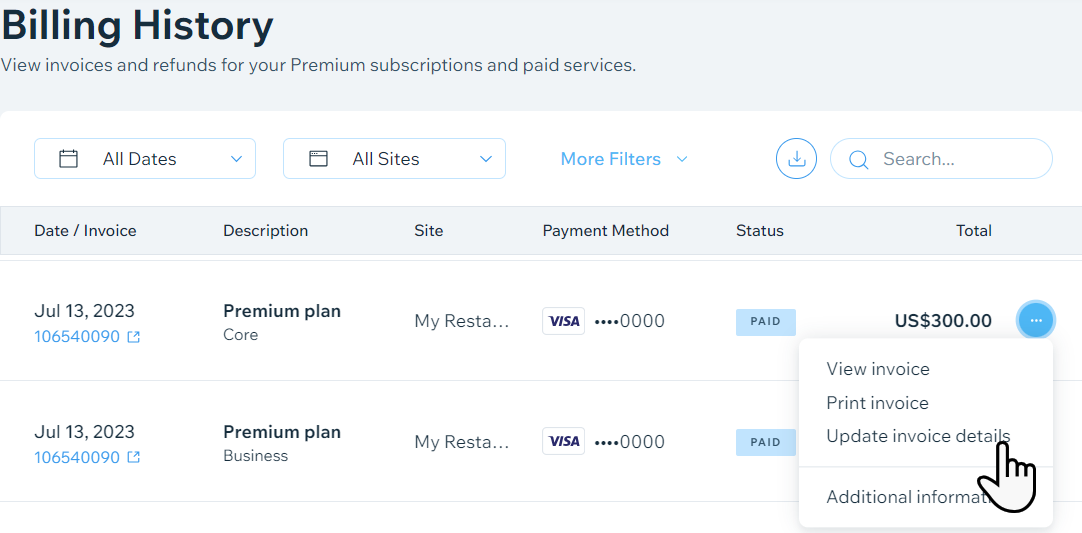
Enter your new details in the relevant fields and click Save.
FAQs
Click a question below to learn more about updating your invoices for Wix services.
Can I update my details for past invoices?
No, for legal reasons it is not possible to update invoice details for past invoices. However, you can update your information to ensure it is included in future invoices.
Can I update my invoice details for multiple subscriptions at once?
No, invoice details need to be updated individually for each subscription in the Billing History section of your Wix account.
Can I add a custom field to my invoices?
Currently, it is not possible to add custom fields to invoices. You can add additional information (like a company registration number) in the "Company Name" field instead, when updating your invoice details.
This article is credited to the Wix team - https://support.wix.com/ and we thank them for that!
