A .com.au domain indicates that a website is related to a business that is located in, or has a license to trade in, Australia. Due to restrictions on who can use a .com.au domain, the process for transferring ownership of these domains requires that you contact Wix Customer Care.
Important:
Transferring ownership of a com.au domain can only be performed for domains purchased at Wix. Transferring a .com.au domain from a third-party domain host into Wix is not currently possible.
Notes:
The .com.au domain ending is for business domains only. It is not for private individual users looking to get an Australian ccTLD. Learn more about Australian .au domains.
The transferee must have an Australian business address.
About the transfer process
In order to transfer ownership of a .com.au domain, you need to submit a request to Wix Customer Care with the title 'Transfer ownership of a .com.au domain'. This process has a non-refundable transfer ownership fee currently set to USD $12.50. It is paid before the transfer can occur and it is charged using PayPal. The fee includes a 1-year domain registration renewal for the new owner of the domain.
Any changes to the following domain fields are considered updates that require you to submit a request to Wix Customer Care:
Business type
Registered business name
ID type
ID number
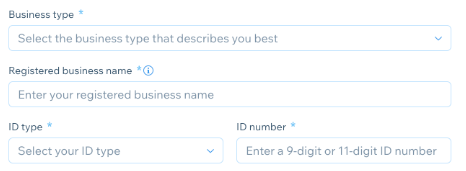
Once you submit your request, you are provided with two forms by Wix Customer Care. The transferor (current domain owner) and the transferee (the company to which they are transferring domain ownership) each need to complete one of these forms with information that indicates the transferee is registered in Australia as a business entity.
There are two forms, one to be filled out by each party:
The Transferor is the owner/someone who is authorized to transfer the domain name license to the new registrant. If you're transferring ownership of your account to someone else, this is you. You need to fill in the 'Current Registrant (Transferor) Form' form and sign a declaration at the end of it.
The Transferee needs to fill in another form called 'New Registrant (Transferee) Form.'
In this form they need to include either:
Their Australian Company Number (ACN), a 9-digit identifier number, or
Their Australian Business Number (ABN), an 11-digit number, structured as the 9-digit ACN with two leading check digits.
Notes:
Wix collects USD $12.50 fee on behalf of the registry and have no control over any change in rate that may occur.
You'll need to have an account with PayPal in order to use their service. This involves registering a payment card, setting up a password, and entering billing details.
Important
After a change of ownership, the domain begins a new registration period. Any remaining time on the original subscription will not carry over to the new subscription.
Completing the forms
Download the two forms sent to your by Wix Customer Care after opening your support request. These are the 'Current Registrant (Transferor) Form' and the 'New Registrant (Transferee) Form'.
Fill in the requested details.
Note: The registrant name must match the 'Registrant' field on the domain's WHOIS listing.
Print each form out and make sure each form is signed by the relevant person.
Upload legible images (in PDF format) of the signed documents to your Wix Customer Care ticket. We'll contact you to confirm whether the transfer was successful or not.
Note: Confirmation may take a number of days as we must rely on independent confirmation from a third party registrar.
Note:
In the unlikely event that the domain holder has an inactive ABN/ACN number, there may be additional forms to fill out. These are the Statute of Declaration form (from their respective Australian state), and the Transfer of Domain Name Chain of Title form.
This article is credited to the Wix team - https://support.wix.com/ and we thank them for that!
