Core Web Vitals are a set of three metrics that assess the experience visitors have when browsing your site. These metrics measure the loading time, interactivity, and visual stability of your site.
Search engines like Google consider Core Web Vitals when determining the ranking of your site. Enhancing these metrics boosts your site's visibility in search results and also improves your visitors' browsing experience.
What are the Core Web Vitals?
Core Web Vitals are important as they measure your site's performance with data from real world usage and visitor experience, as well as lab data from simulated sessions. They display how your site is currently performing, and can provide insights on areas that may need improvement.
The three Core Web Vitals currently in use by Google are as follows:
Largest Contentful Paint (LCP): An indication of a site's loading time - more specifically, how long it takes for the largest content element in the site's viewport to load.
Interaction to Next Paint (INP): An assessment of your site's responsiveness to all click, tap, and keyboard interactions that occur throughout each visit on every page. The final INP value is the longest interaction observed.
Cumulative Layout Shift (CLS): A measurement of unexpected movements of elements that change the layout of the page.
These vitals, along with other measurements, accumulate to provide an overall score for your site's pages.
Improving the Largest Contentful Paint (LCP) metric
The Largest Contentful Paint (LCP) measures the time it takes for the browser to load and display the largest element, excluding background images.
Consider the following information when working to improve your LCP metric:
Text-based LCP elements: For text-based LCP elements, prioritizing quick loading is key. Opting for system fonts can significantly improve performance. However, if a custom font is necessary, we recommend utilizing the WOFF2 format for optimal results.
Tip: In the Studio Editor, enable Default Fonts if your LCP relies on text and includes a custom font.
Image-based LCP elements: For image-based LCP elements, it's best to upload images in either JPG or WebP formats. JPGs, in particular, can offer substantial file size reductions, up to 10 times lighter than PNGs.
Other tips: To streamline the loading process and enhance the experience of your visitors, keep your webpage design simple and minimize unnecessary content. Consider placing heavy elements such as galleries, videos, and store widgets below the fold to prioritize faster loading for critical content. Avoid animating your LCP elements, as animations like fade-in effects only initiate once your site has fully loaded.
Improving the Interaction to Next Paint (INP) metric
Enhancing the Interaction to Next Paint (INP) metric involves simple steps to streamline your site's performance.
To improve your site's INP metric:
Review any third-party code snippets added to your site. You can easily review and manage these snippets within the Custom Code Settings, Marketing Integrations, and scripts associated with third-party apps. Consider removing any code that doesn't provide clear value to your site's functionality.
Limit the number of apps and widgets on each page. Pages overloaded with applications and widgets tend to be more complex and prone to issues. Simplify your pages whenever possible, and refrain from excessive use of applications and widgets that aren't essential to your site's purpose.
Improving the Cumulative Layout Shift (CLS) metric
Improving the Cumulative Layout Shift (CLS) metric involves making simple changes to keep your site's layout stable.
To improve your site's CLS metric:
Consider reorganizing your site's DOM order:
Wix Editor: The DOM order is automatically structured for left-to-right scripts. However, if your site uses a right-to-left script such as Arabic or Hebrew, you'll need to manually adjust the DOM order in the Layers panel.
Studio Editor: Wix Studio sites have an automatic DOM order, with the option to review and adjust the order of the components via the Layers panel.
Update ad placements to minimize their impact on CLS. Placing banner ads at the top of the page can disrupt layout stability. Instead, consider positioning ad components below the fold, such as with Google AdSense ads, to reduce CLS issues.
Performance measuring tools
You can use various tools to gain insights into your site's performance. These tools typically include real visitor data and estimated lab data.
Important:
We highly recommend focusing on real visitor data. You can view this data in two places: the Wix Site Speed dashboard's "Real Visitor Experience" section and Google PageSpeed Insights' "Core Web Vitals Assessment" section. Use these metrics to best understand what your site visitors experience when they load and navigate your site.
Click below for more info about performance measurement tools:
Wix Site Speed dashboard
The Site Speed dashboard reveals your site's current loading speed and offers actionable tips to enhance page loading.
The dashboard consists of two main sections:
Real visitor experience: This section presents data based on the actual experiences of your site visitors during loading. You can view the average speed of your entire site and a breakdown of each page's average speed. Average scores are derived from data collected over the past 30 days. It can take at least two weeks to see substantial metric improvements.
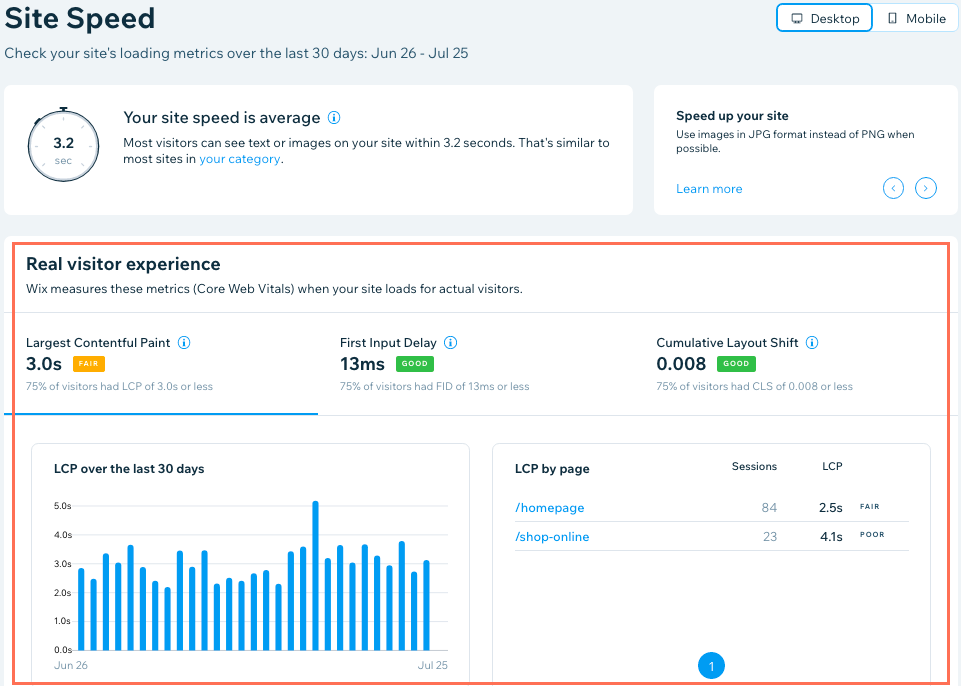
Note: Unlike Google PageSpeed Insights, which only includes Chrome browser visits, this data comes from Wix Analytics and includes visits from all browsers.
Google PageSpeed simulation: This estimates how well your site performs using Google Lighthouse. It pretends to load your site on a slow mobile connection. This can help if your site doesn't get enough visitors for the Real Visitor Experience section to show data.
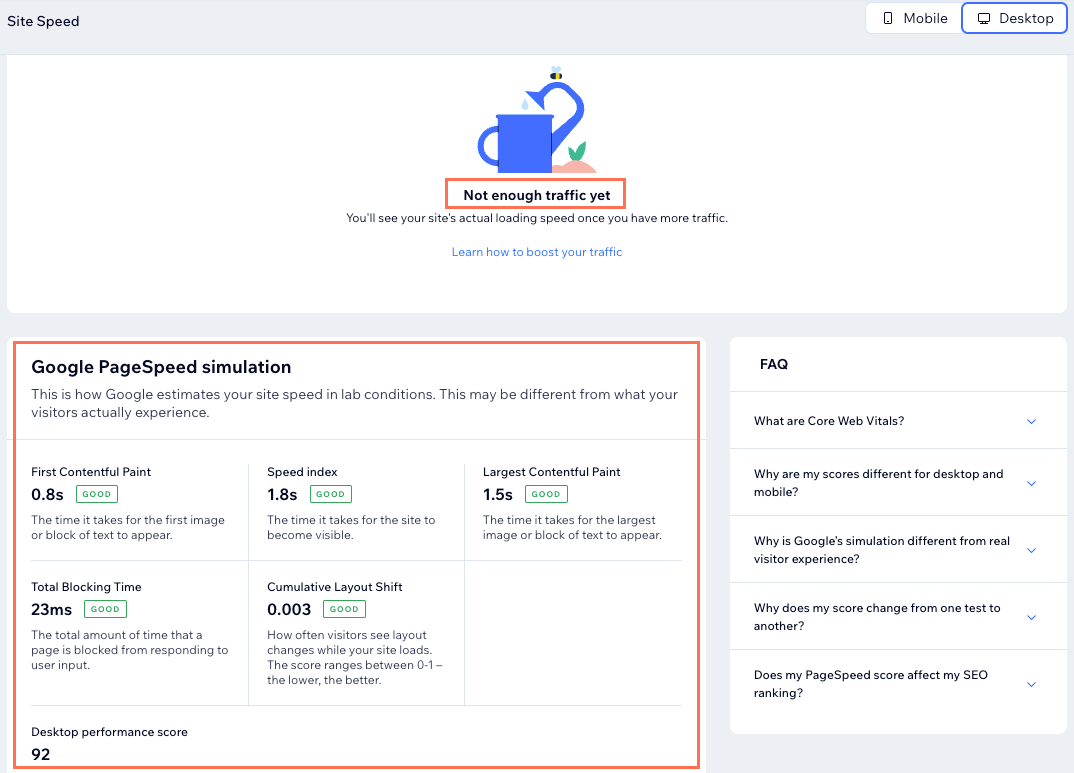
Learn more about using the Site Speed dashboard for tips on improving performance.
Google PageSpeed Insights
Google PageSpeed Insights checks how well your site's pages perform on desktop and mobile. It uses the Chrome User Experience (CrUX) report to study real visitor performance. To give your page a Performance Score, this tool uses Google Lighthouse. You can also get constructive suggestions for areas of improvement.
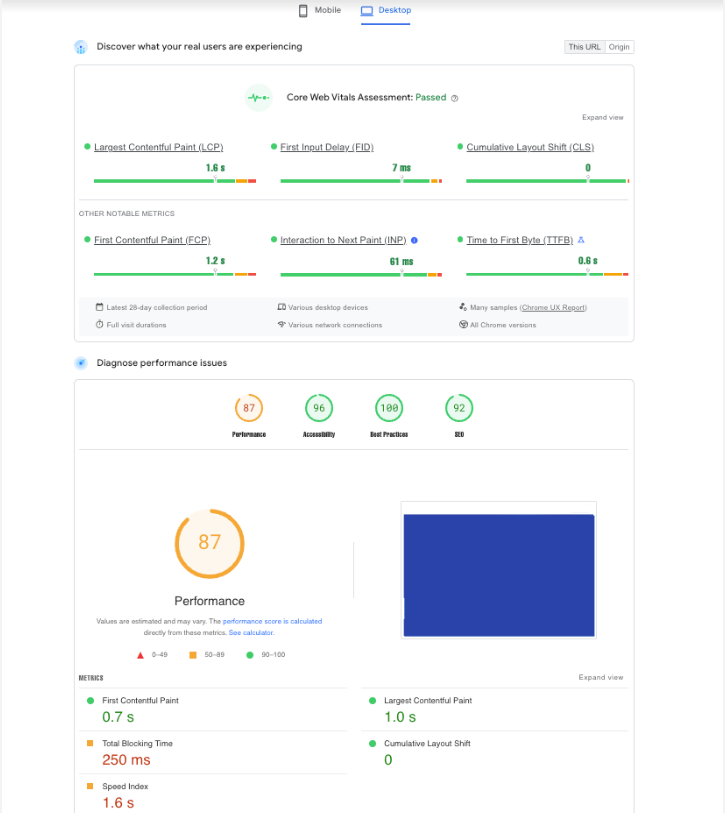
Learn more about improving your site's performance with Google PageSpeed Insights.
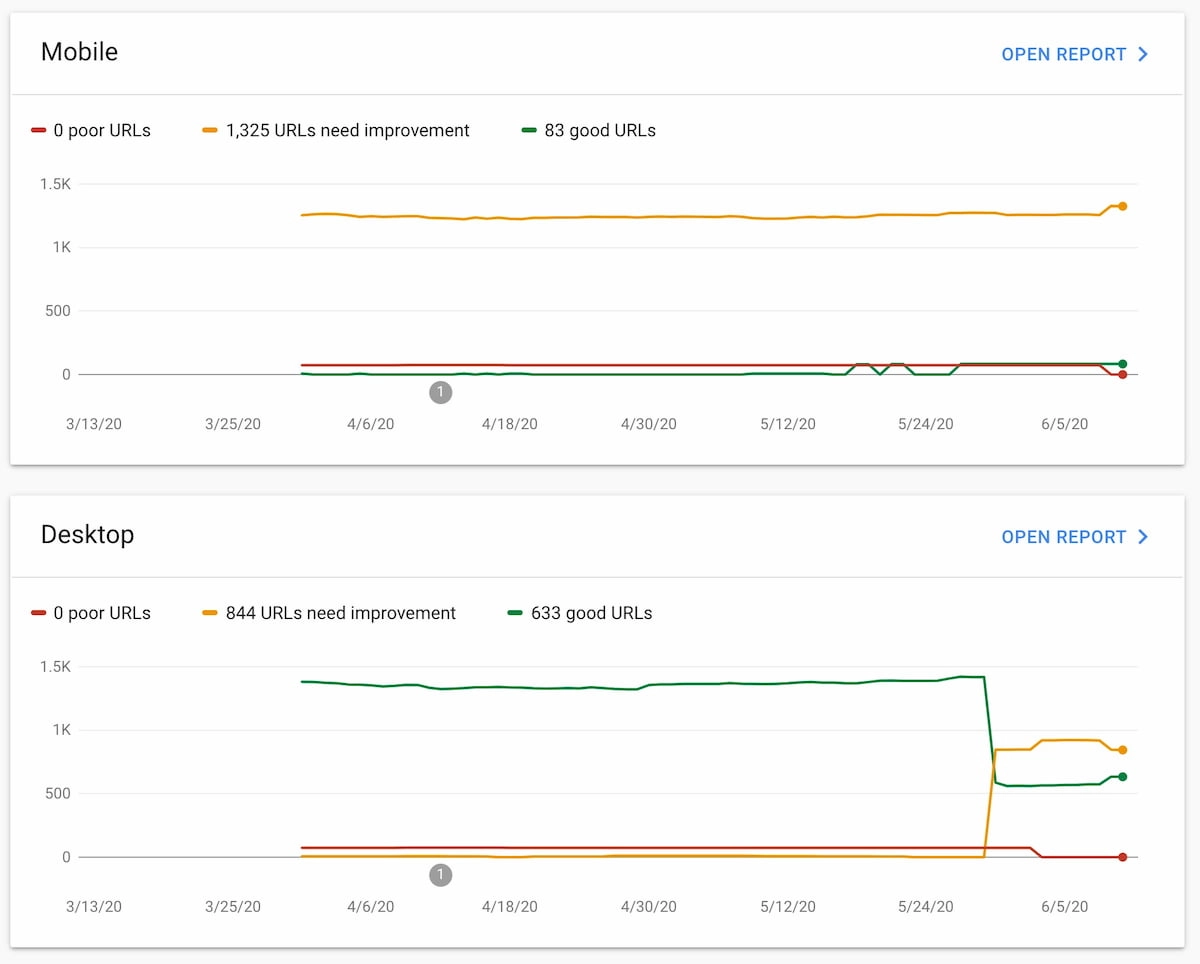
Core Web Vitals Report
Core Web Vitals are included as a displayed metric in both Google PageSpeed Insights and Lighthouse reports. To view Core Web Vitals as a separate report, you can open them in your Google Search Console.
To view a Core Web Vitals report in your Google Search Console:
Select a property (domain).
Click Core Web Vitals under Experience.
Select either the mobile or desktop report.
Note: Google only generates Core Web Vitals reports for sites with sufficient traffic.
Other third-party testing tools
Wix sites are built differently compared to traditional HTML sites. When using external performance tools, keep these factors in mind:
Wix cannot guarantee the accuracy of third-party tests. External speed tests use a "black box" approach that only analyzes external features, so results can vary depending on the tool used.
The amount of content on your site determines the number of certain files (.js, .woff, etc.). Changes you make to your site's content also impacts the number of files.
Some fixes suggested by third parties may be beyond your control. While certain changes may not be possible on your end, Wix is constantly working to improve performance.
To optimize your site's performance and loading time, we recommend following our best practices guidelines.
The difference between mobile and desktop scores
When reviewing your site's Core Web Vitals, you'll receive two distinct reports: one for mobile and another for desktop. It is likely that the two overall scores will be different.
A few factors contribute to this normal difference in scores between mobile and desktop, including:
Mobile devices usually have slower processors than desktops.
Mobile networks (like 3G, 4G, LTE, and 5G) can be slower than WiFi or ethernet connections used by desktop devices.
Core Web Vitals and SEO
Core Web Vitals are crucial indicators of your site's performance and are among the various factors considered for your site's SEO ranking.
The performance SEO boost is applied to mobile and desktop pages separately. Each page, whether mobile or desktop, can receive up to three boosts, one for each Core Web Vital:
Good: Indicates the metric scores earn a Full SEO boost (green).
Needs Improvement: Indicates the metric scores earn a Partial SEO boost (yellow).
Poor: Indicates the metric scores receive No SEO boost (red).
For instance, a mobile page might get a partial SEO boost for LCP and INP, but a full boost for CLS.
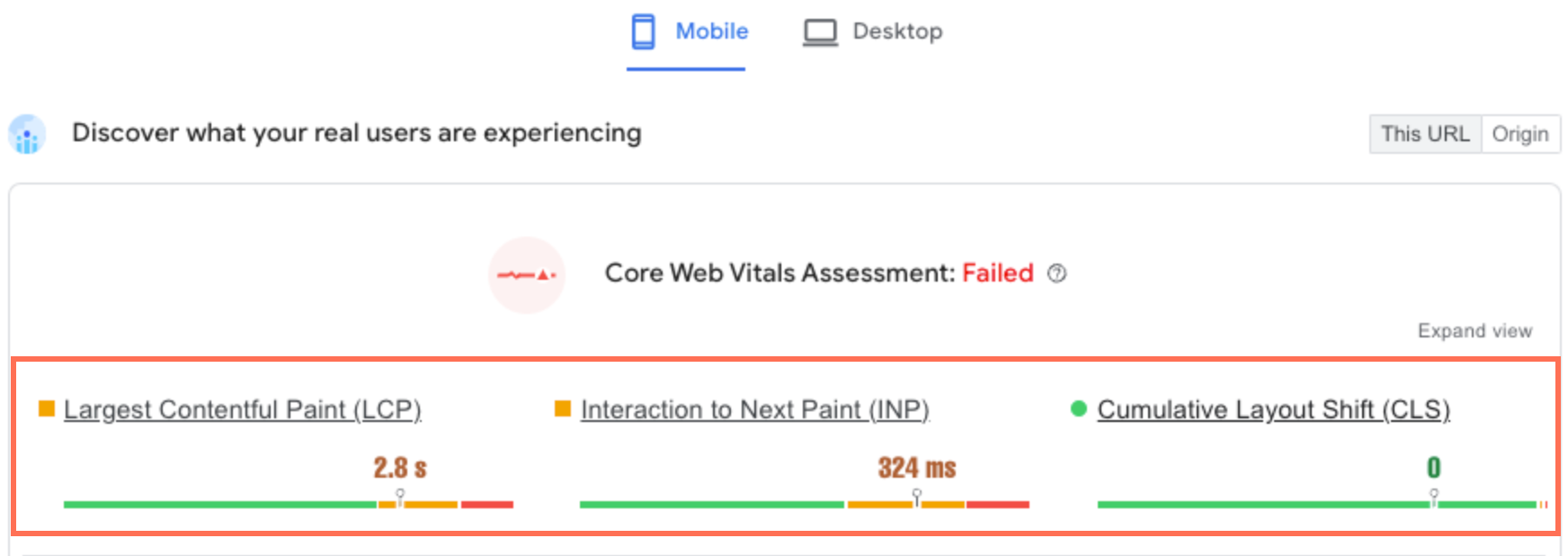
Meanwhile, the desktop version of the same page might receive a full SEO boost for each metric.
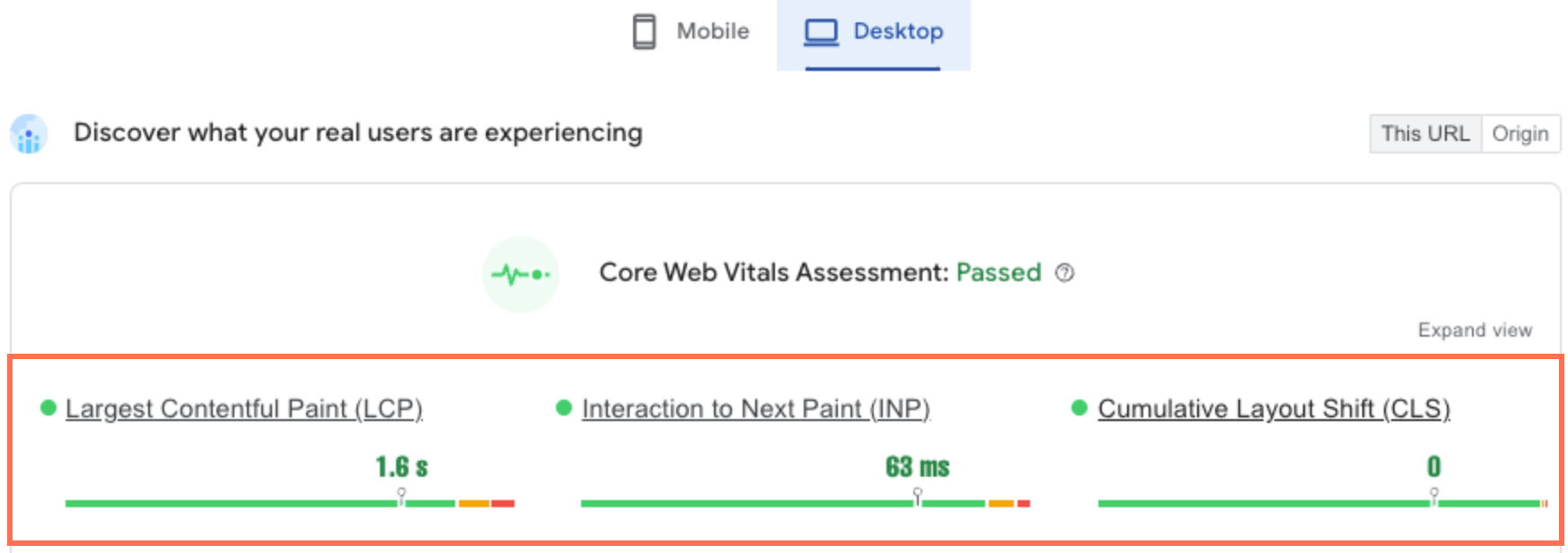
Your Core Web Vitals Assessment will show as ‘Failed’ unless you receive a ‘Good’ score for all three Core Web Vital metrics. This does not mean the page hasn't received a boost, as each metric contributes a boost independently.
Google Search always aims to display the most relevant content, even if the page experience isn't perfect. For most queries, there is a lot of helpful content available. So having a great page experience can contribute to success in search ranking.
Content remains the most important factor in maintaining your SEO score. We recommend optimizing your site's content, as well as updating your page's meta tags. Learn more SEO best practices.
FAQs
Click below for answers to the most common questions about Core Web Vitals.
Why haven't my site's metrics improved after I made changes?
After making changes to your site, we recommend waiting at least 3 weeks to see meaningful metric improvements. Although, the full effect will not be seen until the collection period has passed and all your page views are on the updated site.
Collection periods:
Wix Site Speed dashboard: 30 days
Google PageSpeed Insights: 28 days
If you’re following our performance best practices, but your metrics aren’t improving, please contact us for assistance.
How could my site's performance have gotten worse since INP replaced FID?
Since INP replaced FID, the experience your visitors have while interacting with your site has not changed. The only difference is which metric Google uses to determine your site’s performance.
With the INP metric’s increased visibility, Wix is striving to optimize your site's performance and develop new ways to improve loading time.
What should I do if my speed score is low despite optimization?
If you've already followed all optimization tips but still have a low score:
Check your site's performance in Wix's Site Speed dashboard for real user data.
Review your site's third-party code and apps for potential issues.
If your score is still low, contact Wix Customer Care. Our team can review your site and may involve the Loading Time team for deeper analysis.
This article is credited to the Wix team - https://support.wix.com/ and we thank them for that!
