When purchasing a participating yearly Premium or Studio site plan, you receive a promotional 1 year free upgrade for selected third-party apps.
Please note that this promotion is not available for all site plans. In addition, the apps may differ depending on which plan you purchased, as well as your location. You can find detailed information about which apps you'll receive with which plans on the Upgrade page.
Promotion terms and conditions
The following terms and conditions apply to the free app promotion:
This promotion is not available to all users.
You must redeem this promotion within 60 days from the purchase date of your Premium or Studio site plan.
This promotion lets you upgrade the participating apps for free for a period of 1 year. The app purchase page displays may display the monthly pricing, but you will receive a full year free.
The promotion is provided per account. You may use it on any site in your Wix account. It does not have to be the site you just upgraded.
Redeeming your free apps
We'll send you an email containing the promotion details to the email address associated with your Wix account. Once your receive this email, follow the instructions below to add the app of your choice.
To add your app:
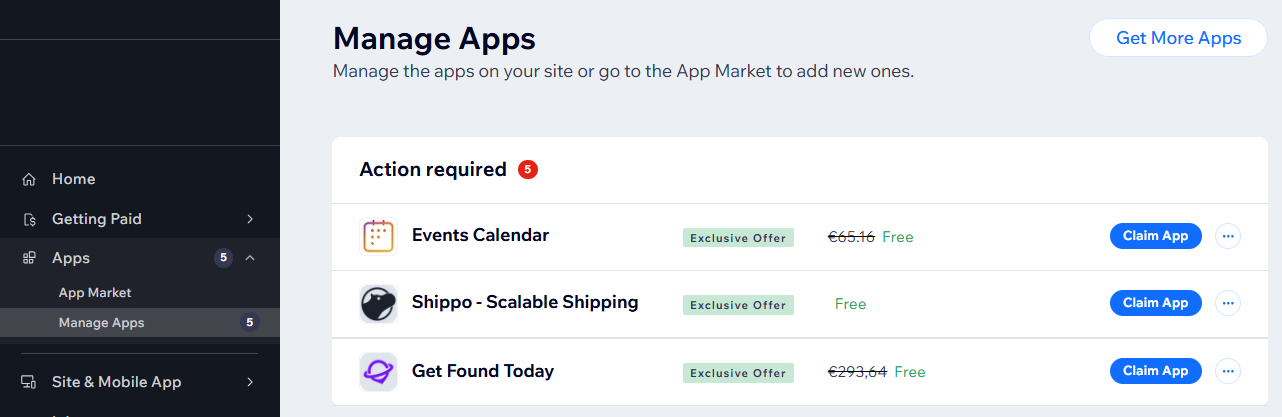
Go to Manage Apps in your site's dashboard.
Click Claim App next to the relevant app.
Click Add to Site on the app market page.
Click Agree & Add.
Follow the steps to upgrade the app.
Click Submit Purchase on the checkout screen after reviewing the details.
Note: Make sure your discount is applied on the checkout screen. The total amount displayed should be $0.00.
FAQs
Click a question below to learn more about free apps.
I've already added a selected free app to my site. Can I upgrade it using the promotion?
Yes. You can still use this promotion to upgrade the apps, even if you're already using them (for free) on your site. Simply select the relevant app in your editor or from Manage Apps in your dashboard, and follow the steps to upgrade it. You'll see the discount on the purchase page.
I've upgraded my site but haven't yet received the free app email. Can I still use the promotion?
This email is in addition to your upgrade confirmation email and is sent approximately an hour after you upgrade to an eligible site plan.
Alternatively, you can go directly to Manage Apps in your dashboard and claim the app there. Follow the instructions above to claim the app of your choice.
This article is credited to the Wix team - https://support.wix.com/ and we thank them for that!
