Hopp blocks are interactive widgets that power your digital presence and enhance your link in bio or instant pages. They offer simple elements like links and media displays, as well as advanced integrations with platforms like YouTube and Instagram. Use these blocks to promote offerings, collect leads, and enable transactions.
Whether you’re a content creator, business, or influencer, Hopp blocks are designed to meet your unique needs and maximize engagement.
Want to follow along?
Go to hopp.co to see all available blocks while you read about them below.
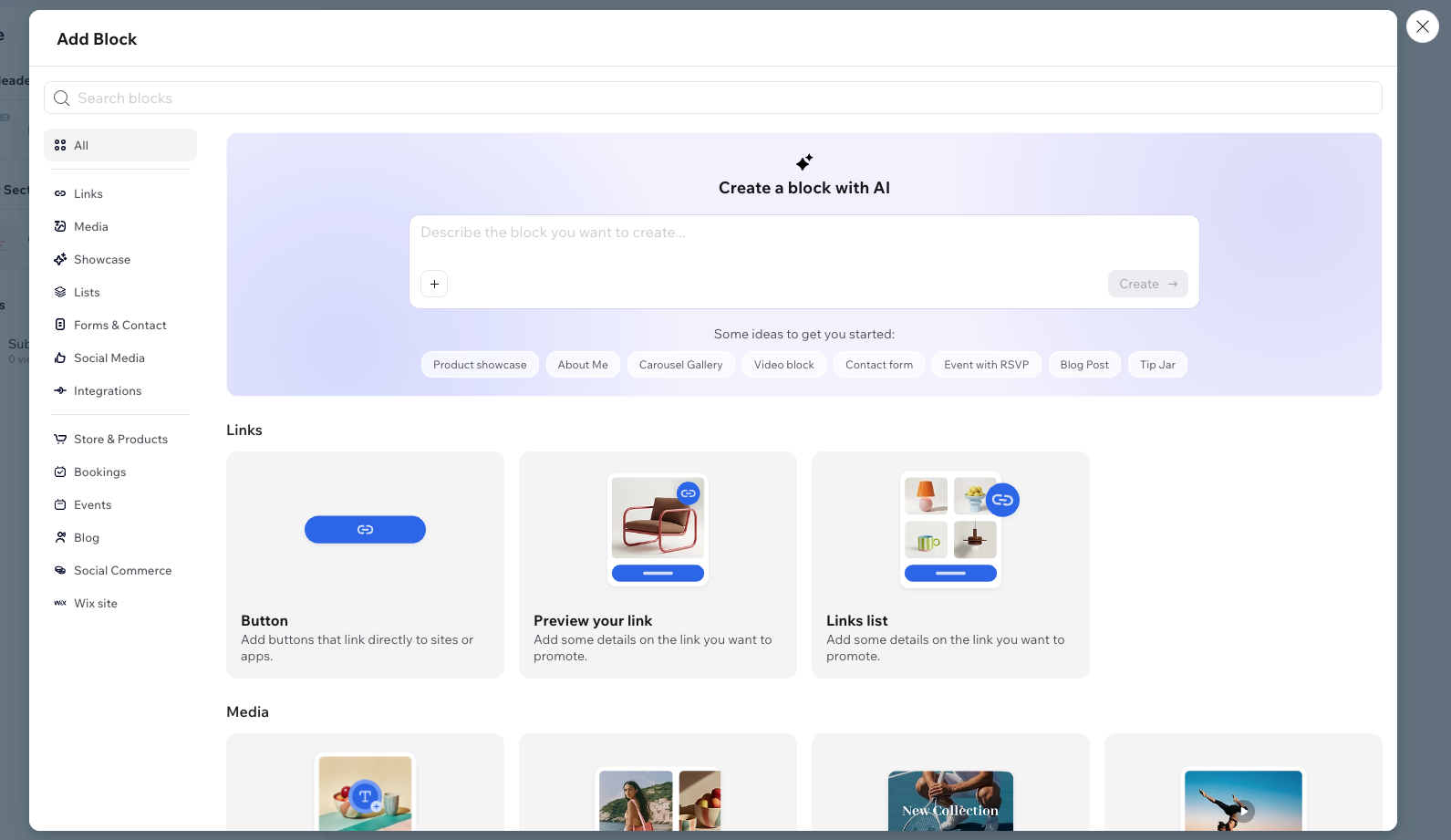
Understanding the Block types
Hopp blocks are organized into categories based on what you want to achieve. Browse the sections below to find the right block for your page or use the Create a block with AI to build a custom block tailored and customized to your needs.
Choose a block category:
Links
These core blocks let you share essential content and guide users to important links.
Button: Add buttons that link directly to sites or apps.
Preview Link: Add links to sites you want to promote on your page.
Link List: Promote a list of links like products, posts, and events.
Media
These blocks let you embellish your page with media galleries, descriptive and visual content, and more.
Media & text: Show a custom block of media (image/video) and a text description.
Media gallery: Promote a gallery of images or videos.
Media banner: Add a media banner with a link.
Video: Embed a video or playlist directly onto your page.
List of videos: Promote a list of embedded videos.
Showcase
These blocks let you display what you’re promoting, who you are and how people feel about you and your business.
Media & text: Show a custom block of media (image/video) and a text description.
Product: Show your product and sell it directly from your page.
Event: Promote an event and get users to RSVP or buy tickets.
Service: Add service details and let visitors contact you directly to book.
Pricing plan: Add your custom pricing plan details.
Blog post: Promote a blog post that you want to share with your followers.
Contact card: Allow visitors to see and download your contact details.
Review: Showcase what people are saying about you or your business.
Coupon: Show coupon codes that people can copy to buy from sites you promote on your page.
Property: Showcase a property and add links for people to buy or rent it.
Map: Show your location on a map that visitors can navigate.
Outfit: Showcase a complete outfit and add links for people to buy its individual pieces.
Ask to share: Get help promoting a link by getting visitors to copy and share it.
Embed: Embed an external URL directly on your page.
Lists
These blocks allow you to add multiple lists or galleries of content to promote to your users. These links include lists of links, content, media gallery, videos, products gallery, services, blog posts, pricing plans, events, properties, reviews, contacts, embedded pages, coupons, and paid requests.
Forms & Contact
These blocks give you many ways to turn fans into leads so your audience can save your contact details and reach out.
Contact form: Add a form for visitors to leave their contact details.
Contact card: Allow visitors to see and download your contact details.
Contact list: Show off your team with a list of contacts.
Collect subscribers: Let visitors join your mailing list.
Contact button: Let visitors contact you via text, email or more.
Social Media
These blocks allow you to promote your social media accounts and attract more followers.
Instagram: Promote your Instagram to get more followers.
TikTok: Embed a TikTok video directly onto your page.
YouTube: Embed a YouTube video directly onto your page.
Facebook: Promote your Facebook page and get more followers.
X: Embed posts from X on your page.
Twitch: Embed your Twitch subscription onto your page.
DeviantArt: Embed DeviantArt content onto your page.
Integrations
These blocks allow you to extend your Hopp functionality by connecting with popular tools and platforms.
Embed: Embed an external URL directly on your page.
Calendly: Adding calendly to your page allows visitors to see your availability and book specific events.
Substack: Promote your substack and get more subscribers.
Google Maps: Show your location on Google Maps so visitors can navigate to you.
Vimeo: Embed a Vimeo video directly onto your page.
Spotify: Let visitors listen to a track or playlist, directly from your page.
Soundcloud: Let visitors listen to a track or playlist, directly from your page.
Apple Music: Let visitors listen to an album or song from your apple music page.
WhatsApp button: Allow users to send you a WhatsApp message.
Telegram button: Let visitors message you on telegram.
Patreon: Promote your paid membership tiers.
Memberful: Promote your subscription plans to page visitors.
Store & Products
These blocks help you to create an entire business hub, straight from your Hopp site.
Physical Product: Sell a physical product with inventory management and shipping options.
Digital Product: Sell a digital product like eBooks, courses, or software with instant delivery.
Store products gallery: Promote a list of products from your online store.
Bookings
These blocks help you book more clients for courses, training, events and more.
Course: Offer educational courses with scheduling and enrollment management.
Appointment: Provide appointment services with booking and scheduling.
Class: Host group classes and sessions with participant management.
List of services: Promote a list of services from your Hopp booking services.
Events
These blocks help you collect RSVPs and fill the seats at your next event.
RSVP event: Let visitors RSVP to an upcoming event.
Ticketed event: Sell tickets to events like concerts, shows, and exhibits.
List of events: Promote a list of events from your Hopp events.
Blog
These blocks help you draw attention to your blog posts and get more clicks and views.
Blog post: Write a short article or post and showcase it, right here on Hopp.
Blog posts list: Show a list of blog posts.
Social Commerce
These blocks give you multiple ways to earn money by way of your link in bio page.
Tip jar: Collect money from visitors with a virtual tip jar.
Paid request: Offer a variety of paid requests that page visitors can buy.
Paid DM: Let people visiting your page pay to send you a direct message.
Wix site
These blocks let you automatically pull content from your connected Wix site to promote on your page as a single item or list of items. Promote from your Wix Store, Blog, Bookings, Pricing Plans, Events, and Contacts.
FAQs
Click a question below to learn more about blocks.
Where can I add a block?
You can add a blocks in both your link in bio and an Instant Page.
Go to hopp.co and log in.
Choose where you want to add your block:
Link in Bio: Click Link in Bio on the left.
Instant Pages: Click Tools and then Instant Pages. Hover over the page you want to add a block to and click Edit page.
Click the Page tab.
Click Add Block.
Choose how to add your block:
Select a block: Search the categories to select the type of block you want to add.
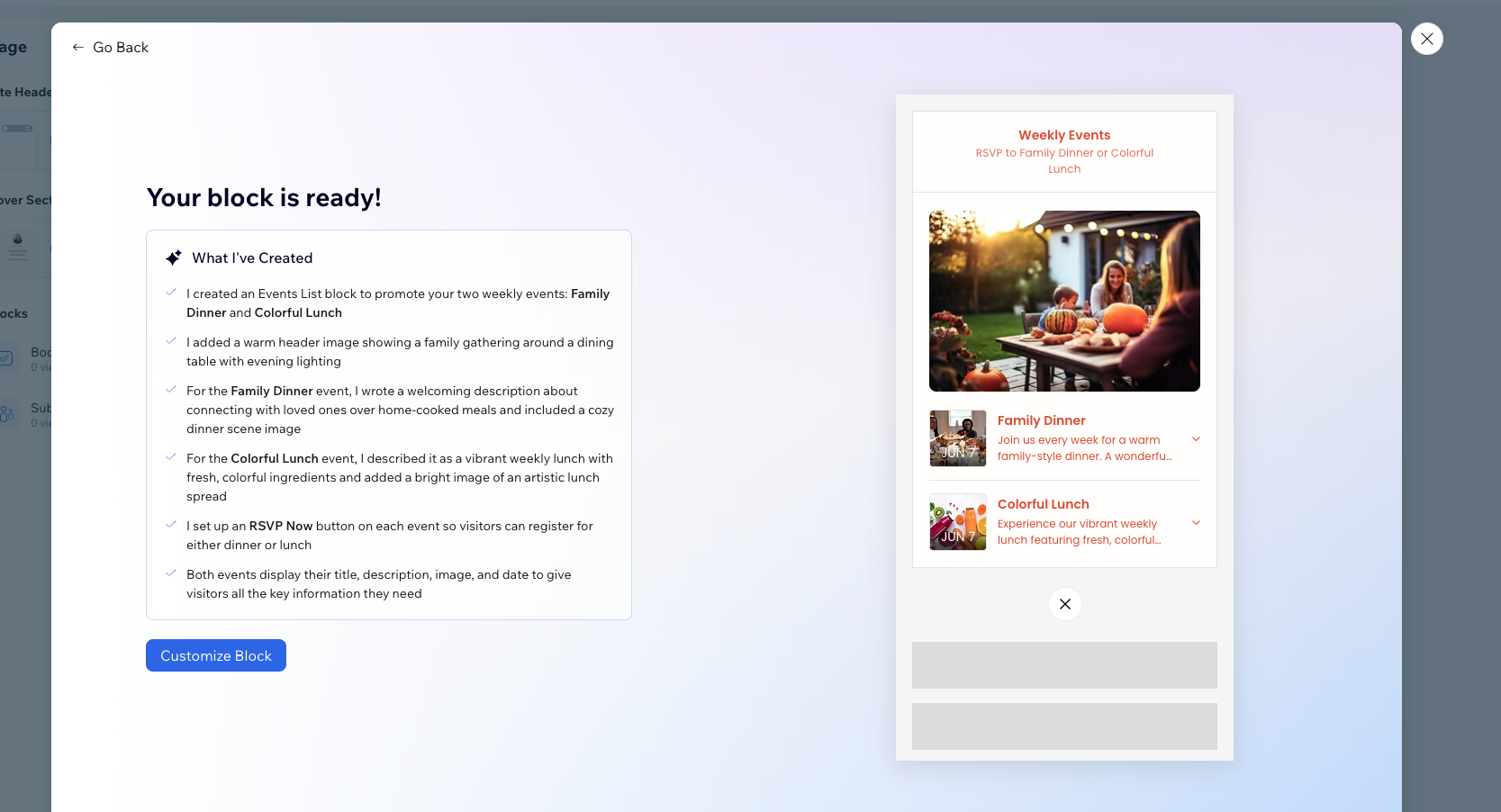
Create a block with AI: Enter a description of the block you want to add, and click Create.
Which display styles are available for blocks?
Hopp blocks offer several styles:
Button: Show your link as a button that can lead directly to a link or expand when clicked to reveal a card with more details.
Card: A module with a background and clear CTA.
On Page: Content shown directly on the page, without its own background.
Banner: An image or video banner that expands to show details and can link to a URL.
How can I make Hopp blocks match my brand?
Customize Hopp blocks to align with your brand by editing the design, layout, preview image, title, and description. You can also enhance functionality with premium features such as locked content or automations.
What are the benefits of connecting Hopp to Wix?
Connecting Hopp to Wix allows you to:
Access and pull Wix Store products, Blog posts, Services, Events, or Bookings directly onto your Hopp page, without needing to copy and paste a bunch of links.
Sync Hopp leads with Wix Contacts for better management.
Trigger automations to enhance marketing efforts.
How can I get the best results when I create a block with AI?
The more detail you include in your description, the closer the block matches what you need. When you describe your block, try to include:
The offerings you want to promote (for example, your events, products, or services).
Any actions you want visitors to take (for example an RSVP form or a booking button).
Design and customization details (for example, the layout, event details, or images you want).
Tip: You can change anything after your block is created. Click Customize Block to fine-tune the design and content.
This article is credited to the Wix team - https://support.wix.com/ and we thank them for that!
