Was your Google Ads with Wix campaign disapproved after you sent it to Google for review? Or does something look wrong after it went live? You can usually identify the issue from the message in your dashboard or from how the ad appears on Google. Check the relevant section below to find a solution for the issue you're seeing.
Preventing campaign disapproval
If Google disapproves your campaign or you want to reduce the chances of disapproval, check the relevant section below.
Troubleshooting disapproved campaigns
After creating campaign content including headlines, descriptions and keywords, you send your campaign to Google for review. If Google finds issues with your campaign, your campaign is marked as disapproved. A 'Disapproved' label and the reason for the disapproval then appears next to your campaign in your Google Ads dashboard. Once you fix the issue, you can resubmit your campaign for review.
Click an issue to learn what it means and how to fix it.
Content not compliant with Google Ads policies
Google doesn't allow ads for the following items:
Counterfeit goods
Dangerous or derogatory content
Adult content
Explosives and weapons
Tobacco and recreational drugs
Misleading and deceptive practices
If your Google Ads with Wix campaign was disapproved, make sure you are following Google Ads policies.
Trademarks
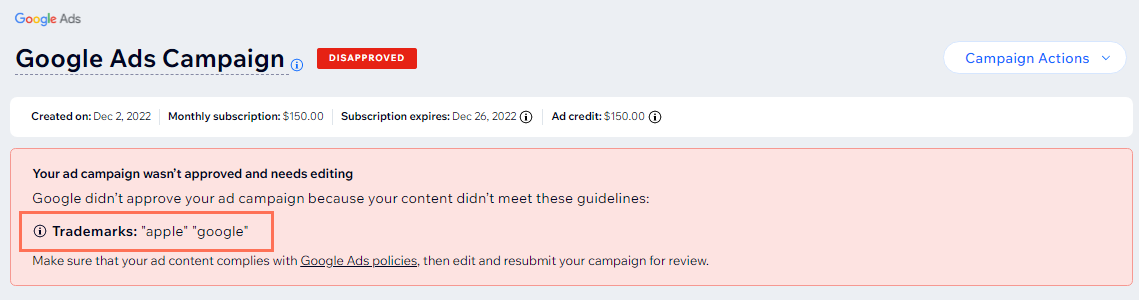
Your campaign may be disapproved because it's in violation of trademarks. Google abides by local trademark laws and requires that all Google Ads campaigns don't infringe on third-party trademarks. The policies apply to text ads appearing on Google Search and are enforced when a trademark owner submits a valid complaint.
Punctuation, capitalization, symbols
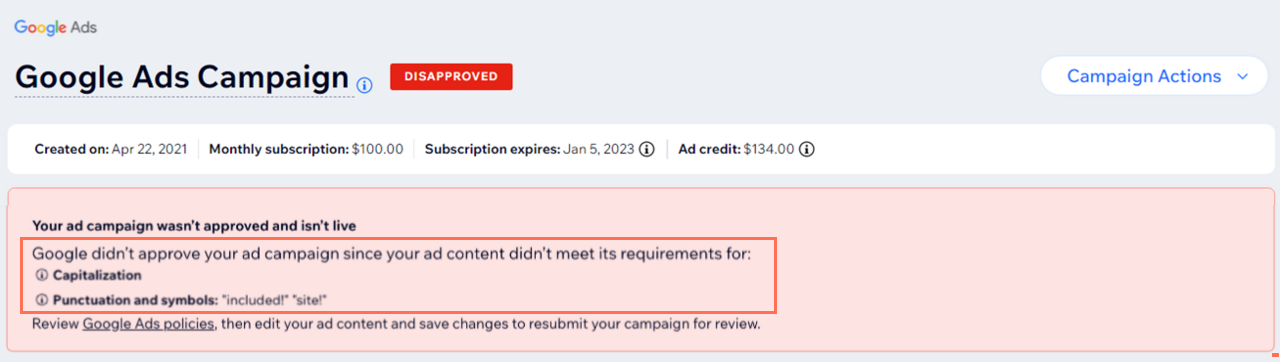
Punctuation and symbols
The following is not allowed:
Punctuation or symbols that aren't used correctly or for their intended purpose (e.g. exclamation marks in the ad headline, repeated punctuation not used for its true meaning).
Invalid or unsupported characters (e.g. Emojis).
Capitalization
The following is not allowed:
Capitalization that's not used correctly or for its intended purpose (e.g. Excessive use of capitalization, such as FLOWERS).
Style and spelling
The following is not allowed:
Ads or assets that don't use commonly accepted spelling or grammar.
Ads or assets that are incomprehensible or don't make sense.
Ads or assets that exceed character limits for double-width character languages.
Ads or assets that are inconsistent with the clear and informational presentation style of the Google Search results.
Destination mismatch
Destination mismatch are ads that don't accurately reflect where the user is being directed, such as:
A domain or domain asset in the display URL that doesn't match the final URL or mobile URL.
Failing to use a subdomain to clearly identify a site from all other sites hosted on that domain.
Redirects from the final URL that takes someone to a different domain.
Tracking templates that don't lead to the same content as the final URL.
Learn more about destination mismatch in Google Ads policies.
Troubleshooting destination mismatch:
Review your URLs:The website or app in your ad (display URL) needs to accurately show which website or app people will be taken to when clicking your ad. This policy also applies to:
Keyword URLs
Tracking
Tracking templates
Proxy display URLs
Edit your URLs so they comply with the policies.
Destination not working
These are destinations that don't function properly or have been incorrectly set up, such as:
A site that returns an HTTP client or server error code.
A site that returns an authentication error.
A site that doesn't work on common browsers and devices.
Check your destination URL to ensure it's working and update the working URL as needed (try the troubleshooting steps below). If your main domain is not working, check with your domain provider and resolve any issues with the domain first.
Troubleshooting destination not working:
If you've received this error, try the following:
Check the URL you've entered.
Fix the ad's destination.
Submit your campaign for review.
Learn more about how to troubleshoot destination not working.
'Your Site is Unavailable'
If you receive the error 'Your Site is Unavailable', there may be an issue with your domain connection.
Check your domain connection with the Wix Domain Assistant to ensure your domain is properly connected to Wix.
Malicious software
If you receive a message about potential malicious software:
Follow the steps in this article to verify your site with Google Search Console.
Go back to your ad campaign and edit it.
Send your campaign for review again.
Circumventing systems
If you receive this error message, Google Ads has suspended your account for violating the Circumventing Systems policy.
If your ad is suspended for 'Circumventing systems':
Google uses automated systems to suspend accounts they believe violate its Unacceptable Business Practices or Circumventing Systems policies.
Google doesn't disclose to Wix which specific site elements or setups triggered the suspension.
Note: Wix can't appeal the suspension on your behalf or override Google's determination, because these decisions are made entirely by Google.
Healthcare & medicines
Google allows pharmaceutical manufacturers to advertise in select countries only. Learn more about Google's healthcare & medicine ad policy.
Inappropriate content
If you receive this error message, Google Ads has suspended your account for violating its Inappropriate Content Policy.
Restricted drug terms
If you receive this error message, you could be using restricted keywords in your advertising, website, and content. Campaigns are usually disapproved that contain any terms from this non-exhaustive list of prescription drugs or active ingredients monitored by Google Ads policy. The most common include 'botox' and 'hyaluronic acid.'
Note: Google allows keywords containing prescription drug terms only in select countries. Learn more about restricted drug terms.
Note:
Some ads may be disapproved because Google must approve them via an authorization form. Wix can't submit certain forms to Google on behalf of users.
Tips to prevent ad campaign disapproval
Before you submit a campaign for review, make sure:
Your ad content and landing pages comply with Google Ads policies.
Your headlines and descriptions follow Google’s Editorial Requirements.
Your destination URL works properly and matches the URL shown in the ad. Learn more about Google’s Destination Requirements.
Your domain is connected and accessible. If your domain is experiencing connectivity issues, try our Wix Domain Assistant.
Troubleshooting live campaign issues
If you're experiencing issues or have questions about your live ad campaign, see our solutions below.
Note:
It can take around 14 days for a Google Ads campaign to fully optimize. Avoid making any changes to your campaign for at least 14 days to allow the campaign to make adjustments and perform.
Click an issue below to find out how to resolve it.
I can't see my live ad
If you can't see your live ad, it could be for the following reasons:
You're searching for your own ad on Google: If you repeatedly search for your own ad using Google Search but don't click on it, you may stop seeing the ad. Google's system can detect the IP address of your computer and stops showing you ads it thinks you aren't interested in.
You've reached your average daily budget: Google Ads displays your ads as often as possible while staying within your average daily budget. When your daily budget is reached, your ads typically stop showing for that day.
Your ad's delivery settings: Your ad's delivery settings determine the average pace that your ads are shown on a given day. If you've set your campaign to standard delivery and you have a lower budget, your ad won't show up in every Google Search in order to achieve a steady delivery throughout the day. Also, if you've set your campaign to an accelerated delivery and look for the ad too late in the day, you may not see it.
My ad text appears differently when it shows up on Google
When you create ad text, Google tests combinations of headlines and descriptions in any order to optimize your ad. To help attract more customers, Google can also pull content from your site page's SEO settings and business information and use it to test alternate ads. This content can include your business name, address, or your page's title tag or meta description. Learn more about how Google chooses ad text for campaigns.
Make sure you've updated your page's SEO settings such as the URL slug, title tag and meta description with the most up-to-date content in case Google uses it to test additional ads.
To update your page's SEO settings:
Click Pages & Menu

on the left side of the editor.
Click the More Actions icon

next to the relevant site page.
Click SEO Basics.
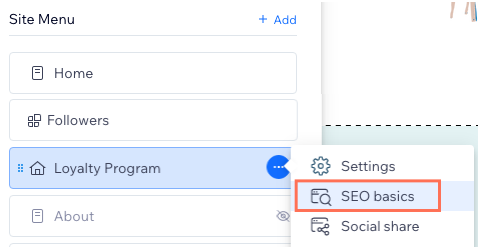
Make any changes to your page's URL slug, title tag and meta description. Learn more about writing title tags and meta descriptions for your page.
Note: The changes save automatically.
The URL below my ad text links to a site page I don't want to show
In order to increase the performance of your ads, Google looks for pages on your site that may be of interest to potential customers (e.g. promotions, coupons, testimonials). Google can then generate an automatic site link, or the URL that appears below your ad text, using any of your published site pages. Learn more about automatic site links.
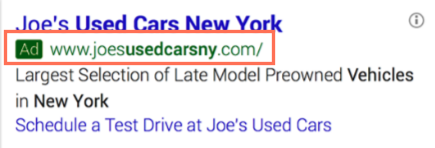
If you don't want Google to display a specific site page below your ad, you need to hide that page from search engines in the page's SEO settings.
To hide a site page from search engines:
Click Pages & Menu
on the left side of the editor.
Click the More Actions icon
next to the relevant site page.
Click SEO Basics.
Scroll down and disable the Let search engines index this page toggle to hide this page from Google Search.

Why doesn't my live ad show a 'Call' button?
A 'call' button may not be shown in every impression of your ad. Similar to other ad assets, Google runs an algorithm to determine whether or not to show the call button in combination with other assets (e.g. image) next to it. This is based on historical performance of the assets and other factors Google tracks and decides on.
Google tests different variations of your ad, and it's normal for a subset of the total ad impressions to appear without all assets included (e.g. the call button). Learn more about bid adjustments.
Why is my average daily budget higher or lower than what I set?
At the top of the main campaigns page, you might see that your advertising costs each day are a little higher or lower than what you set for your average daily budget. If you do, don’t worry: over the month-long billing cycle, you won’t be charged more than your average daily budget would’ve allowed for over 30.4 days. It's calculated as 30.4 because that is the average number of days in a month (365 days in a year / 12 months = 30.417).
Google multiplies your average daily budget by this number. That's how we know what your budget should be over the course of a month.
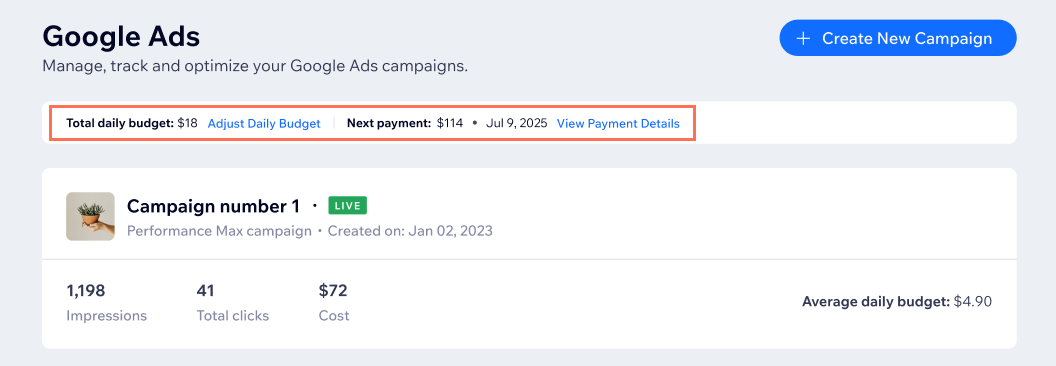
Learn more about managing your budget and monthly subscription.
Why is my campaign spending more than my daily allocated budget?
Google allows up to 2 times the clicks in a day than your average daily budget allows for campaigns that aren’t paying for conversions. This is called overdelivery. And it’s a good thing: if Google ends up showing your ad too much — to the point where you accrue more costs than your average daily budget allows over a billing cycle — then Google gives you credit for those extra costs.
Example:
Let’s say you set your budget at $5 a day and your billing cycle is 30 days. Over the course of the month, you notice that your charges vary. Some days you’re charged $2 and on others you’re charged $10. At the end of the month, your charges won’t exceed $152 (that’s 30.4 multiplied by your $5 budget, as explained above).
Even though your campaign costs varied (tipping above and falling below your $5 budget from day to day), at the end of the month you'll still be charged for the amount you budgeted.
Why does Wix Analytics show my ad appearing outside my targeted locations?
Your ad is shown strictly in campaign targeted locations. If you see ad clicks from outside your targeted locations, it could be due to the following:
The link in your ad was shared.
A discrepancy between Wix Analytics reports and Google. Google and Wix Analytics attribute user location differently. Google has more data on your audience, so it's able to show more accurate location data.
Wondering where your live ad appears?
Your campaign can appear in Google search, YouTube or a Google partner website (AKA Google Display Network).
Note:
Showing ads on Google partner websites is helpful because it puts your ads in front of people before they start searching for what you offer. Reach potential customers while they are doing unrelated activities online (e.g. browsing their favorite websites, showing a friend a video, or using apps on mobile devices). This can be key to your overall advertising strategy.
This article is credited to the Wix team - https://support.wix.com/ and we thank them for that!
