From the main campaigns page in your Google Ads with Wix dashboard, you can view and manage your subscription and adjust your daily spend across all campaigns.
Click a section below to learn more about your Google Ads with Wix subscription and daily campaign budget.
Your monthly subscription and daily budget
What is the difference between a monthly subscription and daily budget?
Monthly subscription: The amount billed monthly (before VAT) as a whole for all campaigns you're running with Google Ads with Wix.
Daily budget: The average amount of money you set for your campaigns to spend on clicks per day. You can set a different daily spend for each campaign.
What does my Google Ads with Wix subscription include?
Your Google Ads with Wix subscription includes:
The amount billed monthly as a whole for all campaigns you run with Google Ads with Wix. Prices do not include VAT, which is determined based on your billing country.
The Wix fee* and tax.
*Wix charges an additional 15% fee for running and optimizing your campaign.
What is the cost breakdown of my monthly spend?
Each month, you'll be charged for the clicks your campaign got in the previous month. Your campaign might spend less than your daily average in some days, and up to twice your average on other days. But each month it won't spend more than your daily average times 30.4 (average number of days in a month).
How do I manage my payment details?
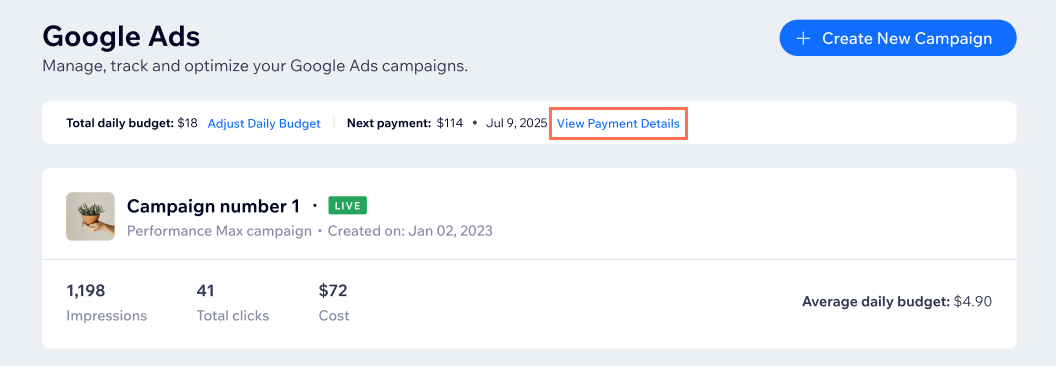
You can manage your payment details by clicking View Payment Details on the campaigns page of your dashboard.
Can I cancel my Google Ads subscription? What happens when I do?
You can cancel your Google Ads subscription at any time via the Premium Subscriptions page of your Wix account. When you do, all your ads will be immediately paused and will stop showing on Google. You'll be charged for the clicks your campaigns received that month so far on the next billing date. If you haven't paid for the previous month yet, you'll pay for both months together on the next billing date.
What is the difference between a prepaid monthly subscription and pay-as-you-go (postpaid)?
Important: These billing options are currently not available to all users. You will only see the option available for your account.
Prepaid monthly subscription: The amount billed monthly (before VAT) as a whole for all campaigns you're running with Google Ads with Wix.
Pay-as-you-go (postpaid): You are billed for the actual amount spent on campaigns each month, after the month ends. The charge will occur on the 9th of each month for what you spent in the previous month.
Note: When you launch your campaign, you are charged $0 at the start of the cycle, to verify your credit card. You'll see an invoice of $0 in your Wix account once the cycle begins.
How your ad budget works
How do I change the daily spend of my campaigns?
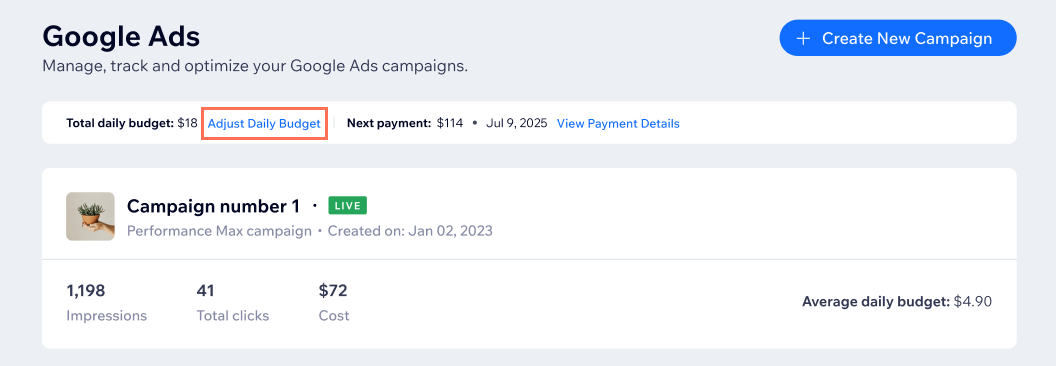
Click Adjust Daily Budget on the campaigns page.
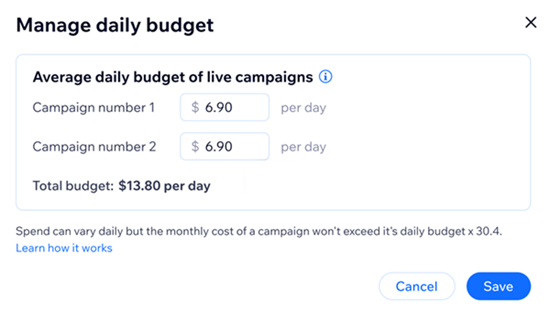
Enter a new daily budget for the campaign(s) you want to change. If you are running more than one campaign, you can see the total daily spend across all your campaigns.
Click Save to update your daily spend. If you have also increased your subscription, you will go through the checkout process at this step.
What happens to my daily budget if it is not fully utilized within the month?
It is possible that your daily spend will not be fully utilized due to a lack of clicks. Each month, you'll be charged for the clicks your campaign got in the previous month. Your campaign might spend less than your daily average in some days, and up to twice your average on other days. But each month it won't spend more than your daily average times 30.4 (average number of days in a month).
What happens when I pause my campaign?
When you pause a campaign, your ad will stop running on Google, and you can resume it at any time.
How does my daily spend work if I am running multiple campaigns?
You pay for one Google Ads with Wix subscription regardless of how many campaigns you run. When you choose a daily spend for a new campaign, it gets added to your monthly subscription cost.
How do I view my Google Ads with Wix invoices?
All invoices for Wix services can be viewed in the Billing History page of your account. Invoices may include VAT, which is determined based on your billing country.
About the Google Ads promotional credit
How do I know if I'm eligible to receive this credit?
You may be eligible for the promotional credit if you're new to Google advertising and have not run a Google Ads campaign previously. Google determines the offer amount and eligibility threshold based on your location and currency.
Tip: Check your campaign dashboard for the specific promotional offer available to your site, and review Google’s terms and conditions.
How long do I have to spend the ad credit after receiving it?
The amount of time you have to use the promotional credit depends on the terms of your specific offer. Check the details shown in your campaign dashboard and Google’s terms and conditions.
How is the ad credit applied to my account?
Once you meet Google’s eligibility requirements for your specific offer, Google automatically applies the promotional credit to your campaign. You’ll receive an email and a dashboard notification when the credit is added.
Does turning off auto-renewal of my subscription affect the credit?
No. Turning off auto-renewal does not cancel your eligibility for the promotional credit, as long as you still meet Google’s promotional requirements.
Why am I not seeing the credit immediately?
Purchasing a Google Ads with Wix subscription does not apply the promotional credit immediately. Google applies the credit only after you meet the eligibility requirements for your specific offer.
Note: Since the credit comes directly from Google, it may take a few days to appear after you meet the requirements. If you are not eligible for the offer, you may not see any message in the dashboard.
Currency questions
What happens when I pay for my subscription in a currency other than USD?
When your campaigns get clicks, Wix pays Google in one of 4 currencies: US Dollar (USD), Euro (EUR), Great British Pound (GBP) or Japanese Yen (JPY). If you pay for your Google Ads subscription in another currency, your monthly payment is converted from USD to your own currency.
You can find the exact conversion value for the current subscription period next to Total daily budget and Next payment on your campaigns page.
What are the Google Ads supported currencies?
The supported currencies that Wix can apply to your Google Ads campaigns are:
US Dollar (USD)
Euro (EUR)
Great British Pound (GBP)
Japanese Yen (JPY)
This article is credited to the Wix team - https://support.wix.com/ and we thank them for that!
