Stay on top of your Email Marketing efforts by keeping track of your campaign statistics. With this valuable information at your fingertips, you'll have the insights you need to craft effective and engaging campaigns in the future.
Accessing your campaign statistics
From the Email Marketing tab in your site's dashboard, you can get a comprehensive view of your delivery, traffic, and device data, allowing you to see exactly how your audience is responding to your campaigns.
To access your campaign statistics:
Go to Email Marketing in your site's dashboard.
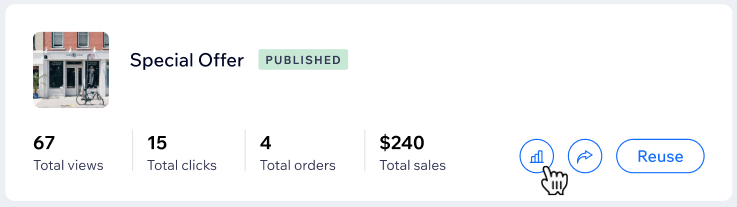
Click the Check Stats icon

on any published campaign.
Click the relevant tab at the top: Email statistics, Email recipients or Social statistics.
Understanding your email statistics
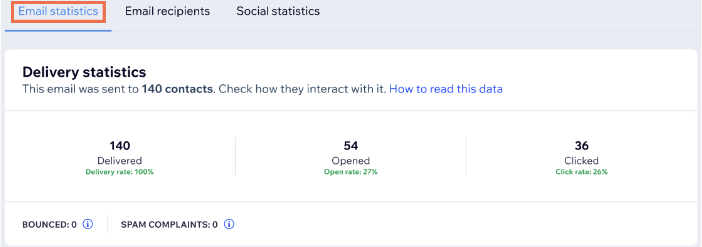
In the email statistics tab, you can find detailed information on your delivery, traffic, and device data. This gives you valuable insights into the performance of your campaign.
Note:
Email statistics update every 3 hours, so you can track the progress of your campaigns and make informed decisions about future efforts.
Click below to learn more.
Delivery statistics
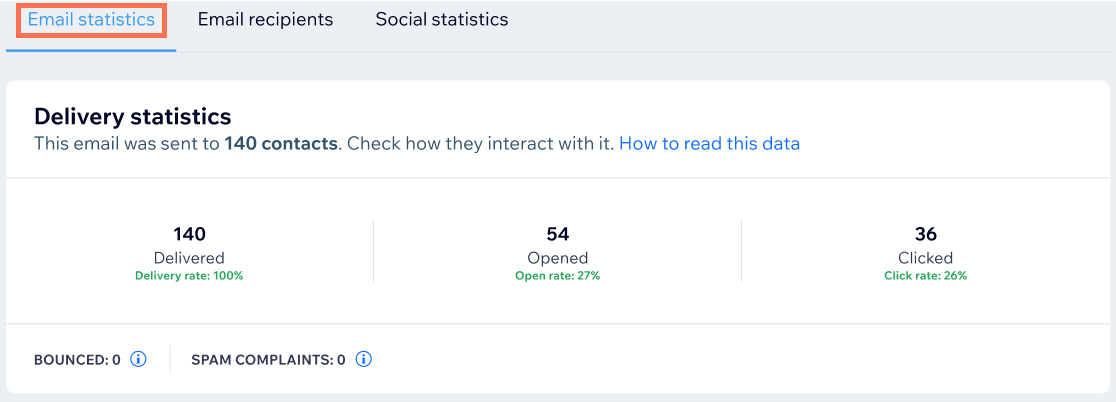
Your delivery statistics data provides valuable information about how your contacts responded to your emails, including the number of emails that were delivered, opened, clicked, bounced, and reported as spam so that you can make informed decisions about your future email marketing efforts.
Delivered: The delivered metric refers to the number of emails that were successfully received by your contacts. If your Deliveredrate is low, you may want to clean up your mailing list to increase deliverability.
Opened: The opened metric refers to the number of delivered emails that were opened by your contacts. This information provides insight into the effectiveness of your subject line and the level of interest your email generated. Important: Learn more about the discrepancies that will impact email Opened statistics below.
Clicked: The clicked metric refers to the number of recipients who clicked a link within your email. This is an important indicator of how well your call-to-action resonated with your contacts.
Bounced: The bounced metric refers to the number of emails that could not be delivered. It's important to regularly monitor your bounced emails and take steps to address any issues that may be affecting your delivery rates.
Spam Complaints: The spam complaints metric refers to the number of recipients who reported your email as spam. It's important to always follow best practices for email marketing to reduce the risk of your emails being marked as spam.
Traffic
Your traffic data provides valuable insights into how your email campaigns are driving interactions with your site. By tracking your unique visitors and site sessions, you can better understand the impact of your emails on your audience and make informed decisions about your future email marketing efforts.
Unique Visitors: A unique visitor is defined as an email recipient who interacts with your site after viewing your campaign email. This means that a person's actions can only be counted once even if they visit your site multiple times.
Site Sessions: A site session starts when an email recipient visits your site after viewing your campaign email and ends after 30 minutes of inactivity. Each time a new session is started, it's counted in your traffic data.

Sales
If any orders are placed on your site, you'll notice a new Sales section in your statistics, providing the following information.
Total Orders: Orders include all purchases, such as store orders, bookings, and any other transactions made on your site, regardless of their payment status (unpaid, canceled, refunded, etc.).
Total Sales: Sales reflect the overall revenue generated from all sales, for both online and manual payments. This is before any deductions for refunds, shipping fees, or other charges.

Unique clicks by device
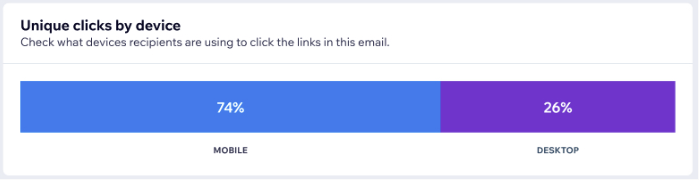
Unique clicks by device data provides insights into how your email recipients access your site. This data can help you optimize your site for your audience and improve their browsing experience. Learn more about creating a mobile friendly site.
Top links clicked
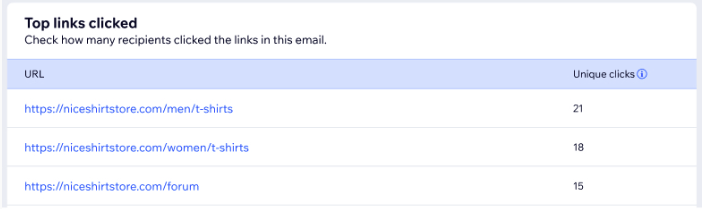
Top links clicked data shows the number of unique clicks each link in your campaign email received. This information can provide insights on how to optimize your email campaigns and keep your audience interested.
Tip: For more insights and detailed marketing reports, visit Wix Analytics.
Understanding your email recipients
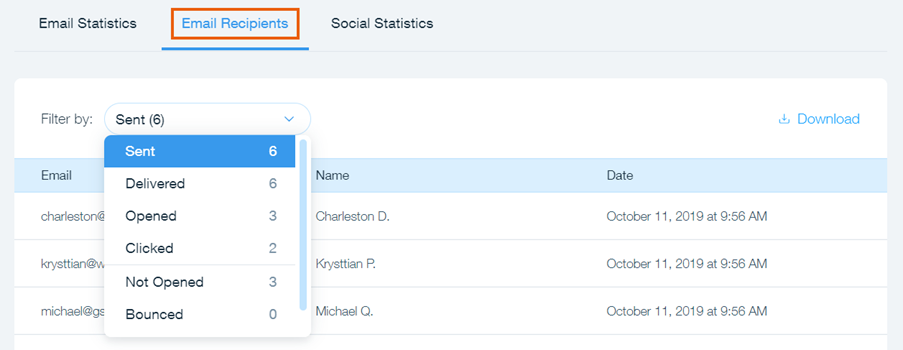
In the email recipients tab, you can see the list of contacts your campaign was sent to. You can filter this list by any statistic including 2 additional filters, Not Opened and Not Sent.
Not Sent: The list of recipients that were not sent to if sampling to a new client list is not passed.
Not Opened: The list of recipients who did not open your campaign.
Tip:
Click Download

at the top right of any filtered list to export the list.
Understanding your social statistics
In the social statistics tab, you can see how people engage with your campaign on social media. The data includes the total views and clicks on your campaign on social media platforms, clicks on the campaign URL, and any time 'View in a browser' was clicked in the email campaign.
Click below to learn more.
Web and social statistics
This section provides valuable insight into how your email campaigns are being received on social media.
By tracking both views and clicks on your campaign, you can better understand the impact of your campaign.
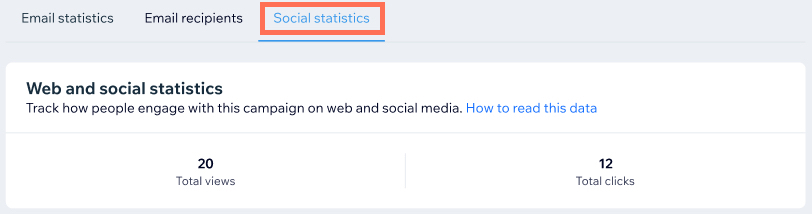
Total views: The total number of web and social campaign views.
Total clicks: The total number of clicks on web and social campaigns.
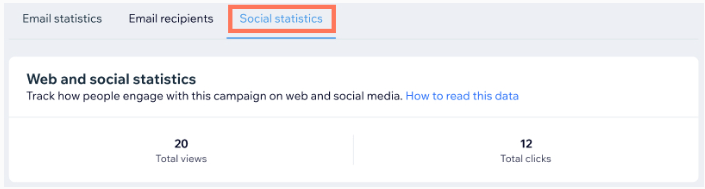
Note: Total views and total clicks are non-unique, meaning a person's actions can be counted more than once.
Top links clicked
This shows the number of unique clicks each link in your campaign email received. This information can provide insights on how to optimize your email campaigns and keep your audience interested.
Tip: For more insights and detailed marketing reports, visit Wix Analytics.
Want to continue the progress of your campaign?
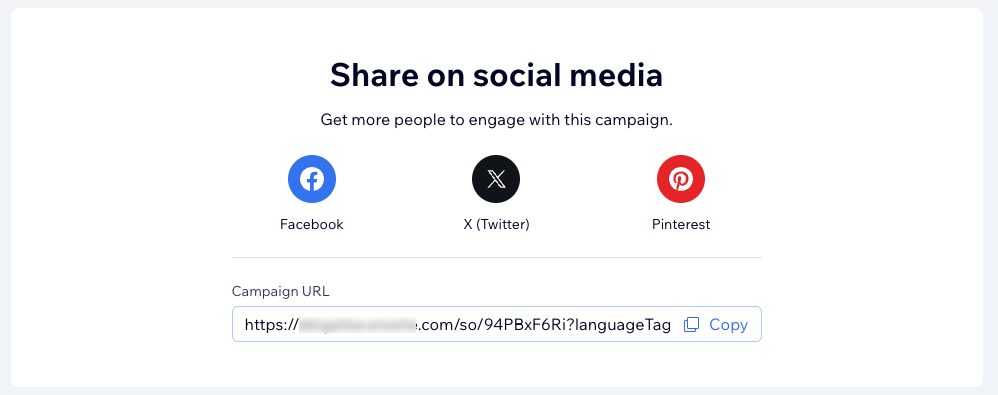
Share your campaign URL on social media. You can share the campaign on social media from this panel or copy the link.
Discrepancies in your statistics
It may take some time for recipients to read your email campaign, and for the information to update accordingly in your email marketing dashboard and statistics.
Click an issue below to learn more:
Campaign statistics show that all emails have been opened in less than 24 hours
This could be happening due to an Apple Mail Privacy Protection update.
Globally, around 40% of emails are viewed using Apple Mail on Apple mobile and desktop devices. With iOS 15, Apple device owners who have set up the Apple Mail app receive a prompt to choose "Protect Mail activity" or "Don't protect Mail activity".
When Apple device owners choose “Protect Mail activity”, the Apple Mail app downloads emails received when the app is opened. For a marketing email, this automatic download is counted in campaign statistics as an email being opened.
These false positive results increase the following statistics:
Opened email
Open rate
Recipients who opened your campaign
Recipients that did not open your email statistics
Tip: Track your campaigns success by reviewing your Total Clicked statistics.
Your statistics generally don't seem updated after sending an email campaign.
Make sure to wait more than 24 hours, as it may take some time for recipients to read and engage with your email campaign.
If your statistics don't seem accurate after those 24 hours, it's helpful to prepare the following information before seeking assistance:
The URL of the email campaign
The date you sent the newsletter
The number of contacts you sent to
The names of contact groups you sent to
A few examples of email addresses you've sent to
Describe what is inaccurate about your statistics
This article is credited to the Wix team - https://support.wix.com/ and we thank them for that!
