Personalize the footer of your email campaign to showcase your business information and branding. Add your address, phone number, social networks, and invite people on mobile join your member app.
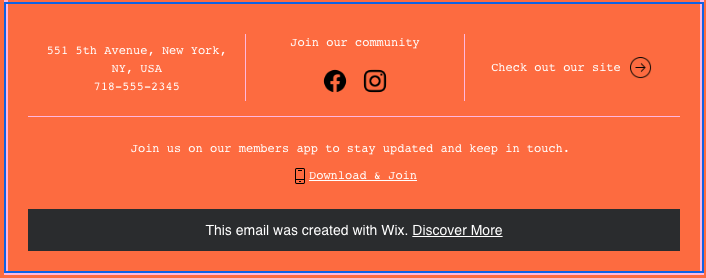
Customizing the footer of your campaign
Modify the footer of your email campaign to show your address, phone number, social networks and more.
To customize your campaign's footer:
Go to Email Marketing in your site's dashboard.
Click Edit next to an existing campaign or create a new one.
Click the footer at the bottom of your campaign.
Select the tab you want to customize:
Content
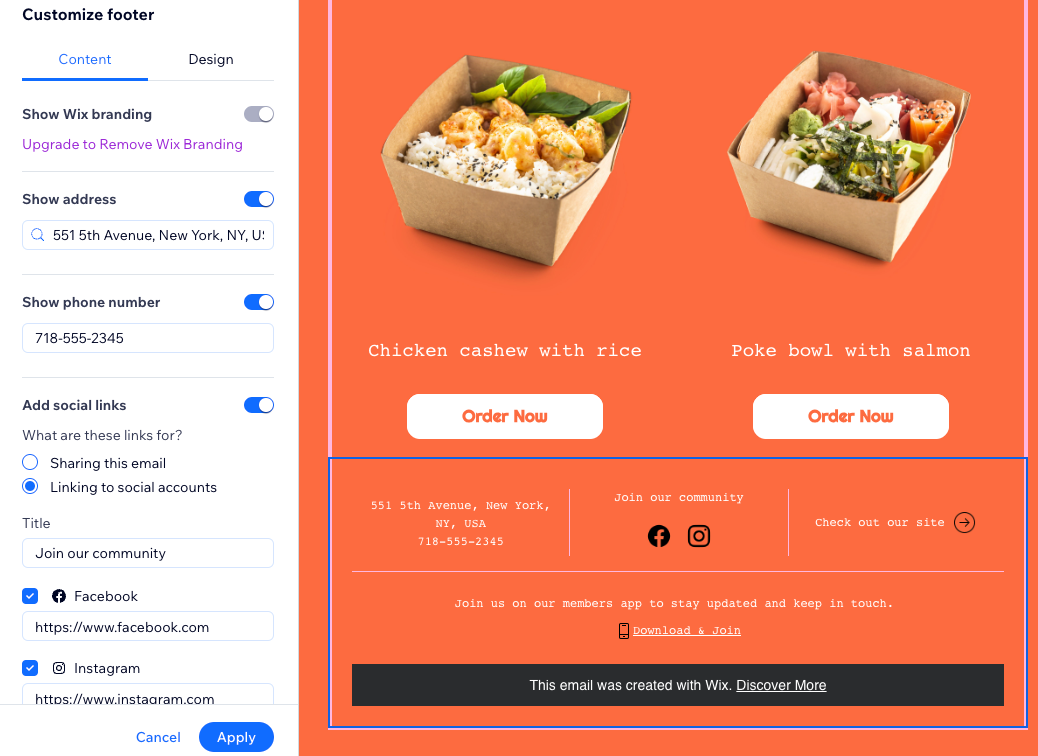
Enable the toggle next to each element you want to display:
Show Wix branding: A Wix branding banner appears at the bottom of the footer. Upgrade to an email marketing plan to remove Wix branding from emails.
Show address: Enter your street address in the field.
Show phone number: Enter your phone number in the field.
Add social links: Enable the toggle to give people the option to either share your campaign on social media, or reach your social accounts.
Sharing this email: Enter an informativetitleand select the social network(s) you want people to share your campaign on.
Linking to social accounts: Enter an engaging title, select the relevant social network(s) and enter your account link(s).
Add a link to your site: Include a link to your site. Enter the link text and the URL you want the text to link to.
Invite mobile members: Add a link to your members app and grow your mobile community. Enter the invitation text and link text.
Design
Customize your footer using the design options available:
Font: Select a font from the drop-down.
Font color: Select a color that matches your brand.
Icon color: Choose the color of your social icons.
Separator color: Choose the color of the divider that separates the content of your footer.
5. Click Apply.
FAQs
Click a question below to learn more about customizing your footer.
Can I edit the unsubscribe message?
No. You cannot edit the 'option to unsubscribe' message, which is automatically added to the bottom of your campaign when you publish.
The language of this unsubscribe message matches the language of your Wix account. You can change the language of your Wix account to change the language of your unsubscribe message. Keep in mind that changing your account's language affects the unsubscribe text for future campaigns only. The language of previously published campaigns does not change.
Learn more about the unsubscribe link that appears at the bottom of your campaigns.
Can I update my footer for all future campaigns?
Yes. Changes you apply to the footer of a campaign automatically appear in future campaigns you create. This way, you don't have to adjust the footer every time you create a new campaign. Future campaigns sent via Wix Automations will also use your updated campaign footer.
This applies to campaigns for a particular site. If you have more than one site in your Wix account, changes you make to the footer of one site's campaign do not apply to another site's campaign.
How do I remove the Wix branding from my campaign?
You can upgrade to an email marketing plan to remove Wix branding from your campaign emails. Once you upgrade, you will need to disable the Show Wix branding toggle from your email composer. Learn more about upgrading your email marketing plan.
Why is the footer in my campaign cropped?
If automatic picture downloads in Outlook are blocked, information in the footer of your email campaigns can appear cropped.

Learn more about how to block and unblock automatic picture downloads in Microsoft Outlook.
Why does my email campaign show “Message clipped” in Gmail?
If your email campaign is long or includes a lot of content, Gmail may show a “Message clipped” message with a “View entire message” button at the bottom. This is a standard Gmail feature and is not controlled by Wix.
Tip: To help prevent this, try creating a shorter email campaign so the full message appears in the inbox.
This article is credited to the Wix team - https://support.wix.com/ and we thank them for that!
