Describe your issue in a chat to get help right away, 24/7.
If needed, you can ask for a Customer Care Expert to step in. Then choose your preferred contact option - chat, phone, or email. Availability may change according to your time zone, language and issue.
Language | Callback hours | Chat hours |
English | 24/7 | Monday-Friday 2AM-6PM EST |
Dutch | Monday–Friday: 09:00–18:00 CEST | Monday–Friday: 09:00–18:00 CEST |
French | Sunday–Friday: 08:00–23:00 CEST (Paris) Sunday–Friday: 02:00–17:00 EDT (Montreal) | Sunday–Friday: 08:00–23:00 CEST (Paris) Sunday–Friday: 02:00–17:00 EDT (Montreal) |
German | Sunday–Friday: 08:00–21:00 CEST | Sunday–Friday: 08:00–21:00 CEST |
Hebrew | Sunday–Thursday: 8:00 AM – 8:00 PM IDT | Sunday–Thursday: 9:00 AM–8:00 PM IDT |
Italian | Monday–Friday: 09:00–18:00 CEST | Monday–Friday: 09:00–18:00 CEST |
Japanese | Monday–Friday: 09:00–01:00 JST | Monday–Friday: 09:00–01:00 JST |
Portuguese | Monday–Friday: 07:00–17:00 BRT | Monday–Friday: 07:00–17:00 BRT |
Spanish | Monday–Sunday: 01:00–18:00 CST (Mexico City) Monday–Sunday: 09:00–02:00 CEST (Madrid) | Sunday–Friday: 01:00–18:00 CST (Mexico City) Sunday–Friday: 09:00–02:00 CEST (Madrid) |
Turkish | Monday–Friday: 10:00–19:00 TRT | Monday–Friday: 10:00–19:00 TRT |
FAQs
Click below for answers to common questions about contacting Wix Customer Care for support.
What information should I have ready before contacting Wix Customer Care?
Have your Wix account details handy, such as your email address and the URL of your site. Additionally, gather any relevant information about your issue, such as error messages, screenshots, or steps you've already taken to resolve the problem.
This helps speed up the support process and allows Customer Care to assist you more efficiently.
Does Wix offer support in Russian or Korean languages?
Yes. We offer email support in Russian and Korean. However, we do not provide callback services in these languages.
Is there a charge for phone support?
Charges for phone support may be applied by your local phone provider. Check with your provider for specific rates. Wix does not charge you for phone, chat, or email support.
Where can I find a ticket number for my support request?
If you're using the Wix Studio platform, you can find all your ticket numbers in your Customer Care ticket log.
If you're not using Wix Studio, how you find your ticket number depends on the type of interaction you have with Customer Care:
Chat and phone support: Make sure to ask the Customer Care expert for your ticket number as it is not automatically sent in chat or phone support.
Email support: After emailing Customer Care, you should receive an email confirming that we received your request. You can find your ticket number at the bottom of this email.
How can I follow up on a previous support request?
Use the ticket number of your support request to follow up on a previous request. You can reference this number when contacting Customer Care again.
To learn how to view your ticket number, view the FAQ above.
What can I do if my call or chat with Customer Care is disconnected?
If your call or chat with Customer Care is disconnected, you can request a new callback or chat to continue receiving support.
What can I do if I need help outside of the listed operating hours?
For help outside of operating hours, you can check the Wix Help Center for articles and guides, chat with our Helpmate, or submit an email support request.
What should I do if chat support is not available in my language?
If chat support is not available in your language, you can still contact Wix Customer Care through other methods like email or callback services.
Is chat support available on mobile devices?
Currently, chat support is best accessed from a desktop computer. For the best experience, log in to your Wix account from a desktop or laptop when seeking chat support.
What can I do if I'm having trouble with my microphone during a voice conversation with Cara?
If you're experiencing microphone issues during a voice conversation with Cara, the Customer Care voice assistant, make sure your browser has permission to access your microphone and that your audio equipment is working properly. For step-by-step troubleshooting, check out Troubleshooting Issues with Cara, the Customer Care Voice Assistant.
Note: Currently, Cara, the Customer Care voice assistant, is available in English only, and is not available to all users.
How do I find Cara, the voice assistant?
You can access Cara from the Help menu in your site's dashboard.
To get help from Cara:
Click the Help dropdown at the top of the page.
Click Start in the Get help from Cara, your voice assistant section.
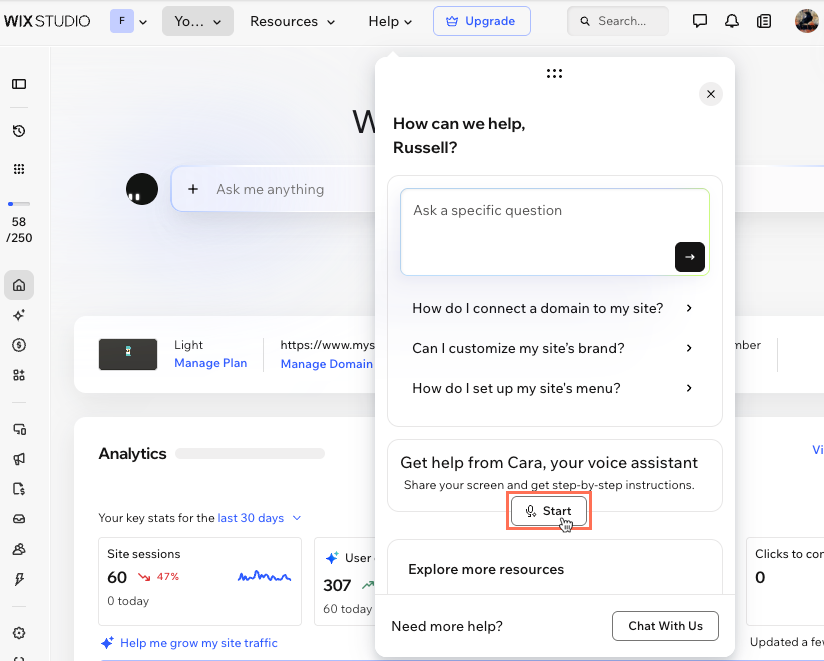
For troubleshooting tips, check out Troubleshooting Issues with Cara, the Customer Care Voice Assistant.
How do I share my screen with Cara?
Sharing your screen lets Cara see what you're working on in Wix and give you step-by-step directions. Cara can only see what you choose to share, and nothing you share is recorded or saved after the conversation.
Important: Only share the window where you're working in Wix. Close or move any windows with personal information before you start sharing.
To share your screen with Cara:
During your conversation, click Share Screen in the Cara panel.
Click Continue in the Share screen? popup.
In the browser popup that opens, click Window at the top, then select the window where you're working in Wix. For example, a browser window is named after its open tab, such as Home | Wix.com.
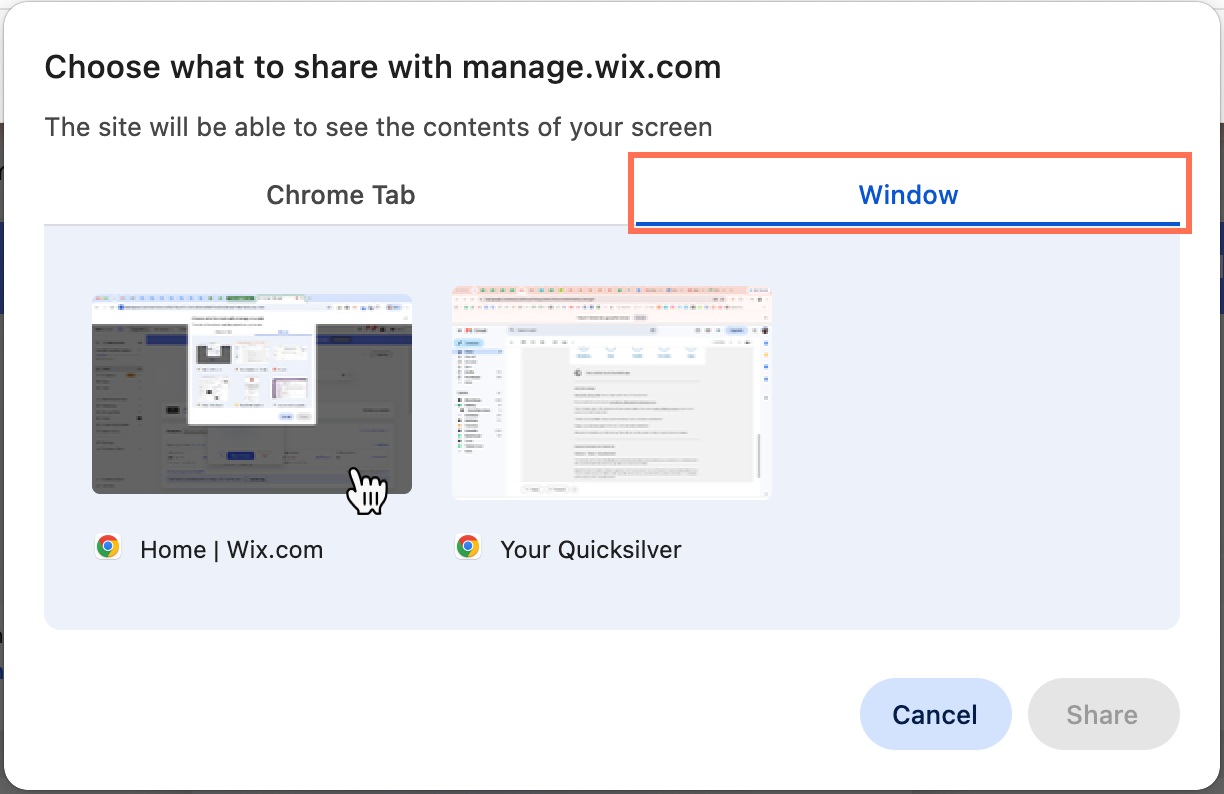
Click Share.
Once sharing starts, the Cara panel shows Screen share in progress, and your browser shows a bar that says your window is being shared.
This article is credited to the Wix team - https://support.wix.com/ and we thank them for that!
