Connect an unlimited number of domains to a single Wix site. Your primary domain connects directly to your site and is your site's main address (URL). Any additional domains you connect redirect to your primary domain.
Important:
If you're connecting an additional domain purchased elsewhere, you must first connect the domain to your Wix account before following the steps below.
To connect a domain to your site, you must upgrade your site with a plan. If you try to assign a domain to a site which hasn't been upgraded, you will have the option of upgrading or assigning an existing plan from another site.
Video tutorial
Watch this video tutorial for a walkthrough about connecting multiple domains to one Wix site or scroll down to read the full article.
To connect an additional domain to your Wix site:
Go to Domains in your Wix account.
Assign your domain to your site:
I want to assign a domain that is currently assigned to a different site
Click the Domain Actions icon

next to the relevant domain.
Click Assign to a Different Site.
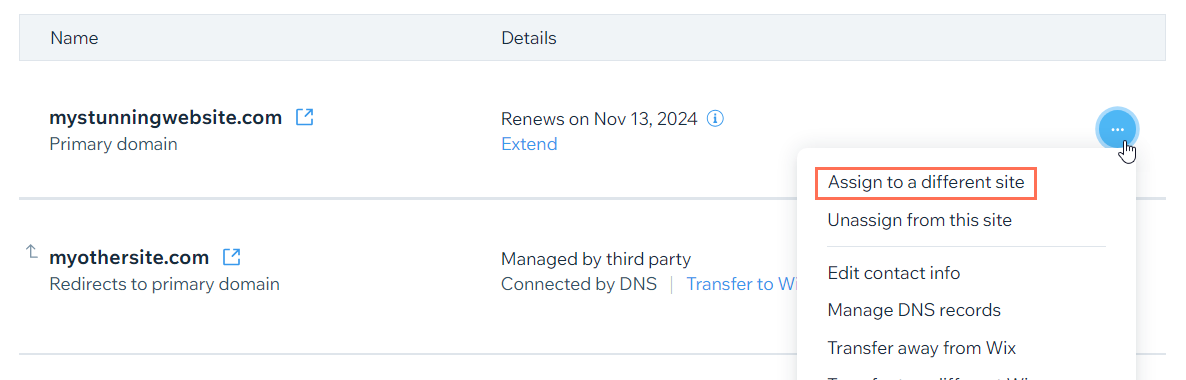
Select a site and click Next.
Note: If the site is currently connected to a different domain, choose an option:
Redirect it to the primary domain: Redirect your new domain to the site's existing primary domain.
Replace the current primary domain: Connect your new domain and disconnect the site's existing domain.
Click Assign.
I want to assign a domain that is not currently assigned to a site
Scroll to the relevant domain and click the Assign button next to the text Not Assigned to a Site.

Select a site and click Next.
Note: If the site is currently connected to a different domain, choose an option:
Redirect it to the primary domain: Redirect your new domain to the site's existing primary domain.
Replace the current primary domain: Connect your new domain and disconnect the site's existing domain.
Click Assign.
Allow 24 hours for the redirection to propagate:
For the first 24 hours, the site is available under two domain names (both the primary and redirected domain). After 24 hours, the URL in your browser's address bar changes to your primary domain when you enter your redirecting domain's URL.
Tip:
When using Google Analytics, you only need to add a tracking ID to your primary domain. Learn more about using Google Analytics with your Wix site.
This article is credited to the Wix team - https://support.wix.com/ and we thank them for that!
