A deferred dataset is a dataset that is set to load its connected content after the rest of the page loads. When an element is connected to a deferred dataset, the non-CMS-connected (static) content of the page loads first, and only after that does the CMS-connected content load. Learn more about datasets.
Before you begin:
Make sure to enable Dev Mode in order to set up a deferred dataset.
Why use a deferred dataset?
A dataset controls what content from your collection is displayed on your site using a specific element. Some elements, such as repeaters, allow you to display a large amount of content at once. However, depending on the size of the dataset, this may have an effect on your site's loading time.
When a repeater is connected to a large dataset, it is known as a 'heavy repeater'. Using a deferred dataset can help improve the performance of a page with a such a repeater.
What is a heavy repeater?
We consider a repeater to be 'heavy' under these conditions:
The repeater has more than 4 connected inner components that include images.
The repeater is bound to a large collection that can potentially generate a large page displaying many repeater items.
Important:
All elements connected to the deferred dataset are rendered after the other elements on the page. The repeater is the most common case where the full benefit of the deferred dataset is seen. However, it is important to remember that if a piece of text, an image or any other element is also connected to the deferred dataset, these elements are rendered last along with the repeater.
Limitations and important info
Please note the following limitations to using a deferred dataset.
You can set any regular dataset to be a deferred dataset. However, you cannot set a dynamic page dataset to be a deferred dataset.
You can only set a dataset to be deferred if the dataset mode is set to 'Read' or 'Read & Write'.
We highly recommend that you do NOT add a dataset filter that uses a deferred dataset as the value source. This would cause both datasets to render at the same time, therefore, the deferred dataset would not be deferred.
If you have multiple datasets on a page, elements connected to the deferred dataset do not load until after the other elements that connect to the non-deferred datasets load.
Important:
Your content is not rendered on a server, therefore it is not indexed by any search engine. As a result, it will not be recognized in terms of SEO.
A repeater connected to a deferred dataset can trigger layout jumping, so it is recommended to use the deferred dataset for a repeater outside the visible area of the page.
This is an advanced feature and is not normally required. When used incorrectly, it can actually slow a page down. Please make sure you have a clear understanding of how it works before deciding to use it.
Setting up a deferred dataset
Go to your editor and navigate to the relevant page.
Go to the relevant dataset settings:
Click CMS

on the left.
Click Manage Page Connections.
Click the More Actions icon

next to the relevant dataset and select Dataset settings.
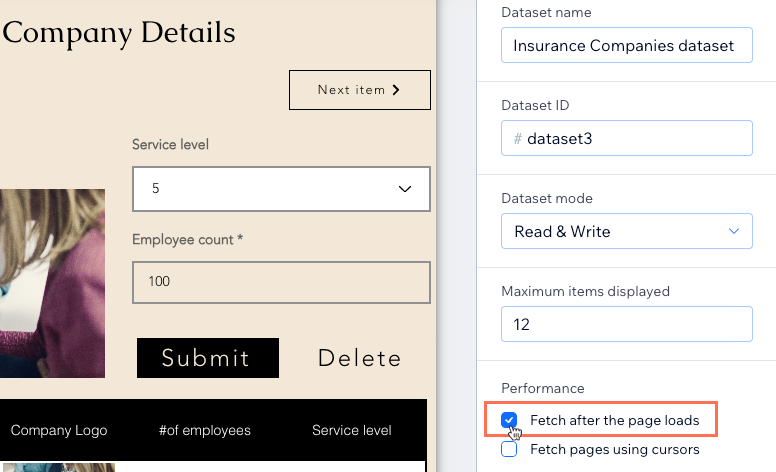
Click the checkbox next to Fetch after the page loads under Performance.
Publish your site when you're ready for the changes to go live.
This article is credited to the Wix team - https://support.wix.com/ and we thank them for that!
