If your site is built in the Wix Editor, you can add links to your mobile menu that take visitors to your dynamic pages. You can also choose to hide links from appearing in your mobile site's menu. If you have other links on your mobile site that lead to pages you want to hide, make sure to also hide the elements that link to these pages.
Notes:
Changes you make in the mobile editor are not applied to your site's desktop version.
If your site was built in the Studio Editor, you do not have a mobile editor where you can choose to hide or show dynamic pages. Instead, your site uses breakpoints that determine how your site looks on different screen sizes. In the Studio Editor, it is not possible to show or hide pages on mobile devices. If this is a feature you would like to see in the future, you can vote for it here.
To show or hide dynamic pages in the mobile editor:
Go to your editor (Wix Editor only).
Click the Switch to mobile icon

at the top of the editor.
Click the Mobile Menu icon

at the top of your page.
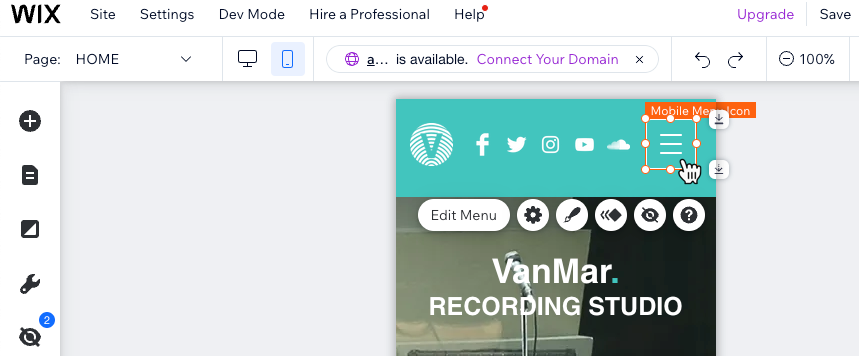
Click Edit Menu.
Click Manage Menu.
Choose what you want to do:
Add a dynamic page to the mobile menu
Click + Add Menu Item and select Dynamic Pages.
Click the Which page? drop-down and select the dynamic pages you want to add to the menu.
(Dynamic item pages only) Click the Which item? drop-down and select the relevant item.
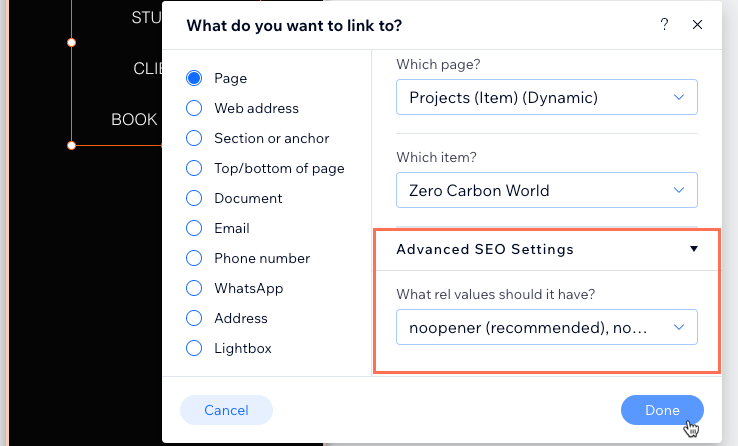
(Optional) Set the rel values for the links in the advanced SEO settings:
Click Advanced SEO Settings.
Click the What rel values should it have? drop-down and select the type of rel attribute you want to use:
noopener (recommended): Block access to the source page.
noreferrer (recommended): Hide info about link source.
nofollow: Tell search engines to ignore.
sponsored: Mark the link as sponsored.
Click Done.
(Optional) Edit the name of the page as it will appear in your menu and click Done.
Publish your site when you're ready for the changes to go live.
Remove a dynamic page from the mobile menu
Hover over the page you want to remove from the mobile menu and click the More Actions icon

.
Select Remove from menu.
Publish your site when you're ready for the changes to go live.
This article is credited to the Wix team - https://support.wix.com/ and we thank them for that!
