When you publish your site for the first time, your site address is in the form of a free Wix URL: siteprefix.wixsite.com/siteaddress.
You can personalize your free Wix URL by changing your site URL prefix or site address:
Site URL prefix: By default this is generated from your name in your Wix account. You can edit your site URL in your Account Settings.
Site address: This is the name of your website. You choose your site name when saving your site for the first time. You can edit it at any time from your site dashboard.
Tip:
You can create a custom web address by purchasing a Premium or Studio site plan and connecting a custom domain. Your domain name is an important part of your unique brand that gives your site a more professional look and can make it easier to find.
Changing your site URL prefix
You can change your site prefix at any time from your account settings. This updates the first part of your free site URL ( siteprefix.wixsite.com/siteaddress).
To change your site URL prefix:
Go to Account Settings in your Wix account.
Click the Site URL prefix field.
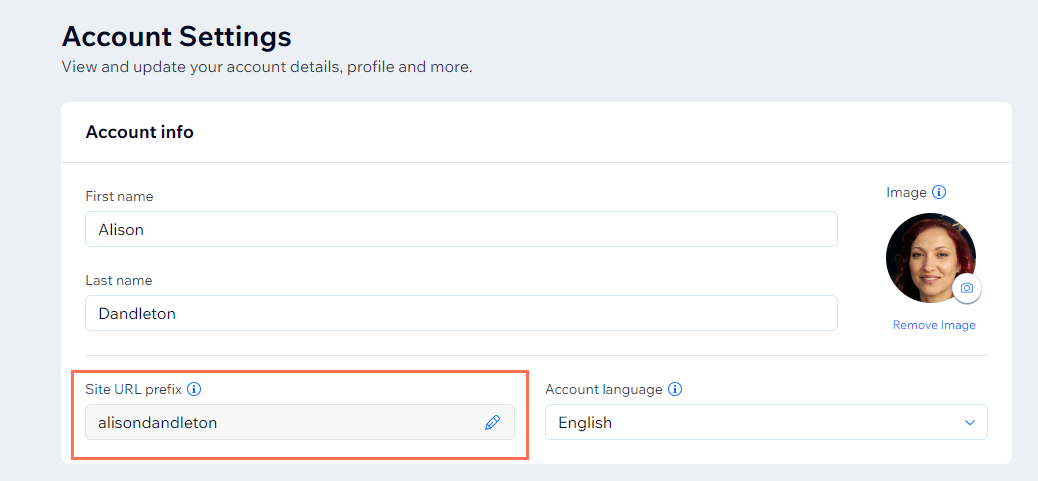
Edit your Site URL prefix.
Click Save.
Changing your site address
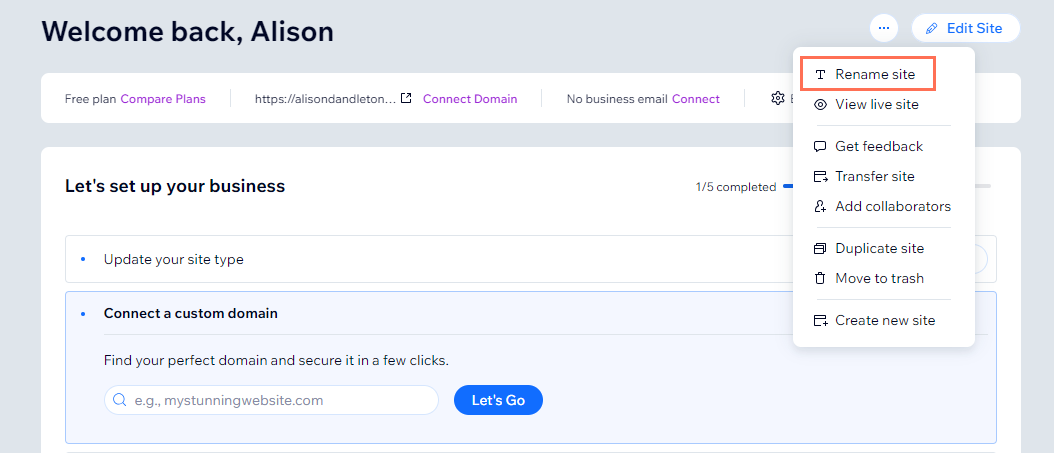
You can change your site address directly from your site dashboard. This updates the last part of your free site URL (siteprefix.wixsite.com/ siteaddress).
To change your site address:
Click the Site Actions icon

at the top.
Click Rename Site.
Enter your new site address in the Site Address (URL) field.
Click Save.
FAQs
Click a question below to learn more about your free Wix URL.
Can I connect a custom domain that I already own to my Wix site?
Yes. You can connect a domain that you already own after upgrading your site.
Will my domain become a custom domain if I upgrade to a Premium or Studio site plan?
Upgrading does not automatically change your domain to a custom domain. Instead, you can either connect a domain you already own, or purchase a new domain from Wix.
If I purchase a Premium or Studio site plan, does it upgrade all of the sites in my Wix account?
No. Each site you want to upgrade requires its own site plan. If you want to upgrade multiple sites in your Wix account, you’ll need to purchase multiple site plans.
What is the Wix free domain voucher and how can I get one?
As a promotional gift, you receive a one year free domain voucher with the initial purchase of selected yearly Premium or Studio site plans.
Is it possible to remove 'www' from my domain name?
Generally speaking, it is not possible to remove 'www' from your domain name, as it is part of a web address' structure. This is true for all custom domains.
Your site visitors may leave out the 'www' prefix when entering your site's web address, for example 'mystunningwebsite.com'. They will still reach your site, but the URL in their browser automatically updates to show the 'www' part.
Free Wix URLs work differently. They don't use the 'www' prefix.
Therefore:
siteprefix.wixsite.com/siteaddress will load normally.
www.siteprefix.wixsite.com/siteaddress will not load.
What happens to my free Wix URL if I transfer the site to another account?
The Site URL prefix part of your free Wix URL is specific to your account. If you transfer your site to another account, the site URL prefix part of the URL will change.
For example:
Paul's site URL prefix is PaulSiteBuilder, and he built a site and named it MyAwesomeSite. The free Wix URL will be paulsitebuilder.wixsite.com/myawesomesite.

Paul transfers the site to Jennifer, and her site URL prefix is JenniferSiteManager. Once Jennifer accepts the site transfer, free Wix URL becomes: jennifersitemanager.wixsite.com/myawesomesite.

The new site owner can change both the site URL prefix and site address from their own account settings. However, you cannot use the same site prefix as another Wix account.
This article is credited to the Wix team - https://support.wix.com/ and we thank them for that!
