When you create a new Wix account, you can choose to sign up by entering an email address and password, or by using a social login (e.g. Google, Facebook). In either case, the email address you enter or the email address linked to your social login gets associated with your Wix account.
Go to your Account Settings if you want to change the email address associated with your Wix account.
Changing the email address of your account
You can change your Wix account email address in your Account Settings.
Important:
Make sure that your new email address is a real address with no typos. Wix sends a code to this email address to verify it.
Each Wix account needs a unique email address. It's not possible to use an email address that's already linked to another Wix account.
To change your email address:
Go to Account Settings in your Wix account.
Click the Account email field.
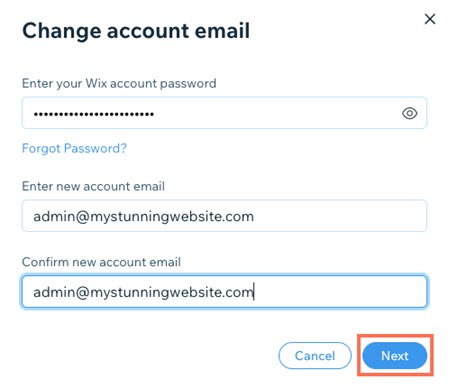
Enter your Wix account password in the pop-up.
Enter your new account email address.
Retype your new email account email address to confirm it.
Click Next.
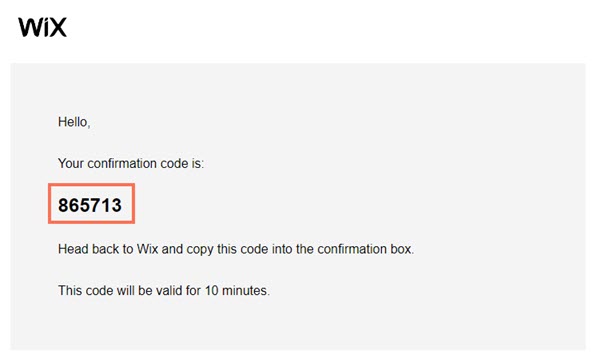
Check your email account for an email from Wix.
Copy the 6-digit confirmation code.
Go back to Account Settings in your Wix account.
Paste the code into the pop-up.
Click Submit.
FAQs
Click a question below to learn more about changing the email address of your Wix account.
I've forgotten which email address I used for my Wix account
If you're not sure which email address you used for your Wix account, you can use the Wix Account Recovery page. Enter your website URL and up to 3 possible email addresses you may have used and we'll help you locate your account.
I no longer have access to the email address I used to create my account
If you know the email address and password associated with your account, you can sign in and change the email address. However, if you are unable to log in at all, you can recover your account in 2 ways:
I can't change my email address because I've forgotten my password
If you know the original email address of your Wix account, or you're already signed in to your account, but you've forgotten your password, you can reset it.
Already signed in:
Go to Account Settings in your Wix account.
Click the Password field.
Click Forgot Password under Current password.
Check your email account for the email titled "Reset your password".
Not signed in:
Click Log In.
Enter your account email address in the Email field.
Click Continue with Email.
Click Forgot Password? under the Password field.
Follow the steps to reset your password.
I see an error saying that my email is already in use
The email addresses you use for your Wix account must be unique. It is not possible to use the same email address for more than one account. If you see this error, it means that another Wix account already uses this email address.
If you own the other account, you can reset the password of that account, log in to it, and decide if you want to keep it or close it.
Click Log In.
Enter the email address you were trying to use in the Email field.
Click Continue with Email.
Click Forgot Password? under the Password field.
Follow the steps to reset your password.
This article is credited to the Wix team - https://support.wix.com/ and we thank them for that!
