Nameserver (NS) records tell the internet which provider manages your domain's DNS records and where to go to find a domain's IP address. By default, domains you purchase from Wix use Wix nameservers.
You can use custom nameservers from another DNS provider and keep your domain registered at Wix. For example, if you use a service like Cloudflare for security, or if your site is hosted on another platform that requires its own nameservers.
Important
When you switch to custom nameservers, Wix no longer manages your domain's DNS. This may affect your Wix site, SSL certificate, mailboxes and any DNS records you set up in your Wix account.
Before you begin
Contact your DNS provider to get the 2 nameservers you need to use. Wix requires both nameservers.
Unassign the domain from your Wix site before changing nameservers. There is no need to reassign your domain after changing NS records. Learn how to unassign a domain from your site.
Changing your domain's nameservers
Change your nameservers from the Domains section of your Wix account.
To change your NS records:
Go to Domains in your Wix account.
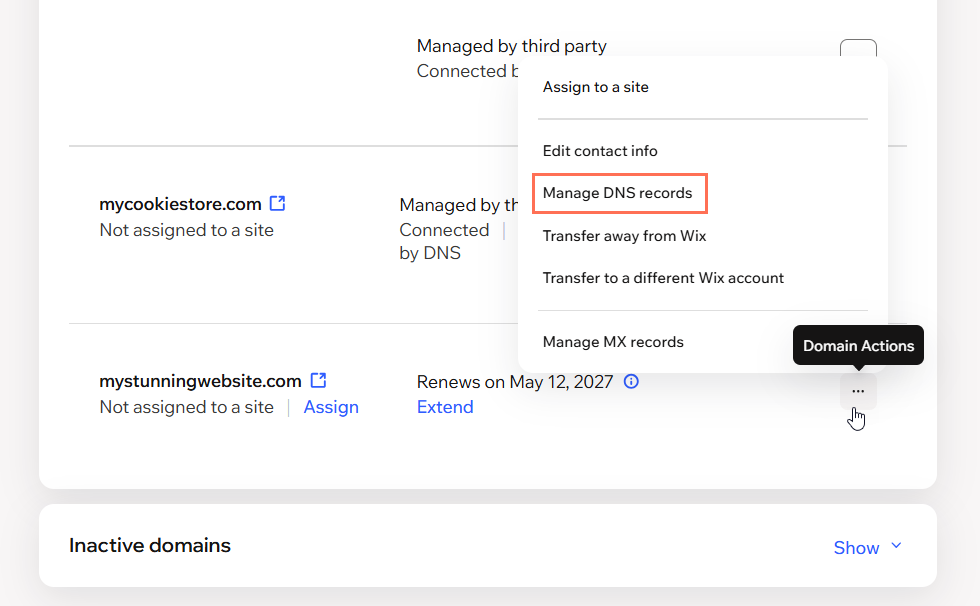
Click the Domain Actions icon

next to the relevant domain.
Select Manage DNS records.
Scroll down to the Nameservers section.
Click Use custom nameservers.
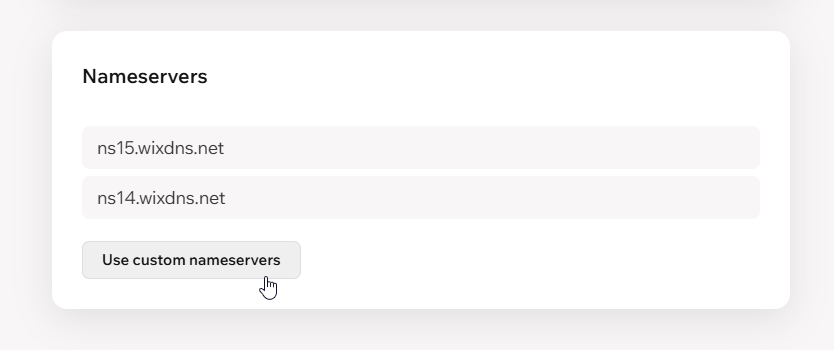
Enter the nameservers from your DNS provider in the Nameserver 1 and Nameserver 2 fields.
Click Continue.
Review the important information on screen and select the checkbox to confirm you understand.
Click Switch nameservers.
What's next?
Nameserver changes can take up to 48 hours to propagate and for your site to appear worldwide. Learn more about domain propagation.
FAQs
Click a question below to learn more about changing your NS records.
What happens when I change my nameservers
After you switch to custom nameservers, your new DNS provider controls where your domain points. Wix no longer manages:
Your site's DNS records: Your domain stays connected to a Wix site only if your new DNS provider has records that point to Wix. Any DNS records you set up in your Wix account stop working.
Your SSL certificate: Wix can no longer renew your site's SSL certificate through your domain's DNS, so check your SSL status after the change.
Email: Wix mailboxes and email routing stop working unless your new DNS provider has the correct MX records. Add the records you need with your new provider.
Can I reset my nameservers to the default Wix records?
Yes, you can reset your nameservers to the default Wix values at any time. This points your domain back to Wix's nameservers, and Wix will manage your DNS, SSL and email again.
To go back to Wix nameservers:
Go to Domains in your Wix account.
Select Manage DNS records from the Domain Actions icon
next to the relevant domain.
Scroll down to the Nameservers section.
Click Reset to Wix.
Do I need to change my nameservers or can I point my domain?
You can change your nameservers if your host or DNS provider requires it, for example if you want to use Cloudflare.
However, if your host lets you point your domain using A and CNAME records, you can do that without changing your nameservers. Learn how to connect a Wix domain to an external site via pointing.
Do I need to transfer my domain away from Wix to use another DNS provider?
No. You can keep your domain registered at Wix and use custom nameservers. This allows you to connect your Wix domain to another provider or website while keeping it with Wix.
Who do I contact if my site, email or SSL stops working after the change?
Once you change your nameservers to point away from Wix, you need to contact your new DNS provider.
This article is credited to the Wix team - https://support.wix.com/ and we thank them for that!
