Use AI to boost your marketing efforts and drive business growth. The AI Marketing Agent allows you to optimize and automate tasks for SEO, social media marketing, email marketing, and paid ads all from one place, saving you valuable time and resources.
This tool makes personalized marketing plans for your approval and assists with choosing keywords, writing optimized blog posts, sending email campaigns, coming up with social media strategies, and more.
Before you begin:
To use the AI Marketing Agent, you need AI credits. The AI Marketing Agent uses AI credits to create content and optimize your site. All new Wix Premium plans include AI credits, and free plans receive 30 daily credits (up to 120 per month). Onboarding is free and doesn't use credits.
Step 1 | Onboard the AI Marketing Agent
Begin by onboarding the AI Marketing Agent to your site. The marketing agent analyzes the unique data of your site and creates a marketing plan that includes your business goal, brand voice, key words, and more. Then, decide which marketing services you want to activate.
To onboard the AI marketing agent:
Go to Marketing Agent in your site's dashboard.
Click Activate My Marketing Agent.
Tip: This makes the AI agent scan your site and create a personalized marketing plan.
Review and edit the plan created by the marketing agent.
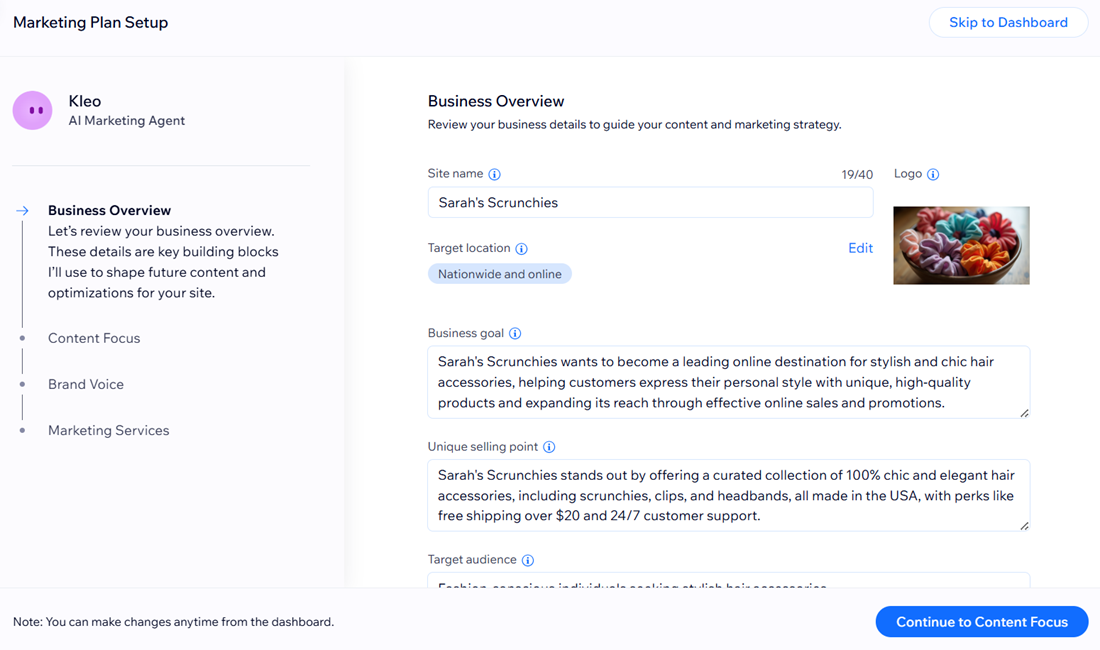
Business Overview
Share essential details about your business to help the marketing agent tailor a marketing strategy and content plan for you.
Site name: Review the name that represents your business or brand.
Important: This changes the name on your Wix account.
Logo: Upload your business logo to display in your business info and marketing assets.
Target location: Select how and where you serve customers so you show up in the right searches. Choose between serving customers from a physical address or local area (e.g. barber, plumber) or online (e.g. blog, online store).
Business goal: Describe the main objectives for your business.
Unique selling point: Describe what makes your business unique and why it's valuable to customers.
Content Focus Areas
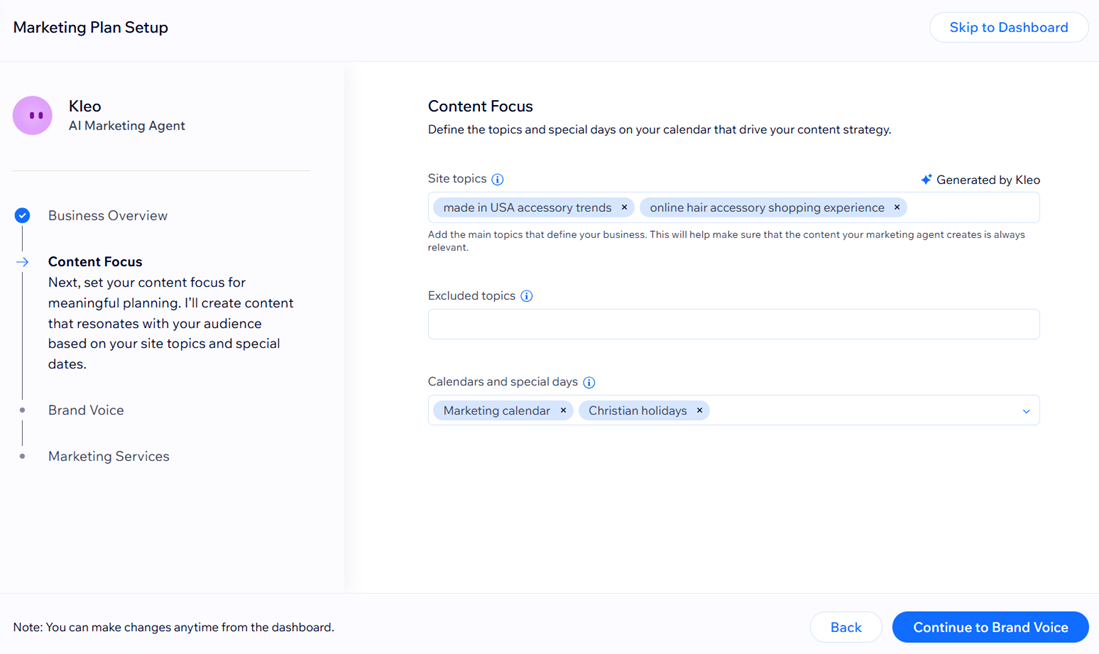
Guide your marketing agent by listing key topics and important dates that should shape your content plan. These preferences help generate original, relevant content for your brand and focus your keyword research.
Key topics: List the main topics and interests you want to highlight in your marketing.
Tip: Add key topics by typing a phrase and pressing Enter or Tab.
Excluded topics: These topics will be avoided in your marketing content. For best results, add topics outside your offering but related to your field.
Calendar-based topics: Choose calendars to feature in your content from the drop-down (e.g. national calendars or religious holidays). These dates help your content stay timely and connect with your audience around important events. For example, on New Years Day, your marketing agent will generate a unique post celebrating the new year.
Brand Voice
Set the style and personality for your brand so the marketing agent can create content that matches your brand and connects with your audience.
Tone of voice: Describe the overall feel or personality you want your content to have. For example, "Use upbeat and friendly language".
Target audience: Explain who you want your content to speak to by describing your audience's interests or needs. For example, "Individuals of all fitness levels seeking flexible workout options".
Click the Advanced settings drop-down to further personalize your brand voice:
Writing perspective: Click the drop-down to choose the point of view your content uses: First person, Second person, or Third person.
(Optional) Custom instructions: Add extra guidelines for your marketing agent to follow, such as "Avoid technical terms" or "Don't use emojis".
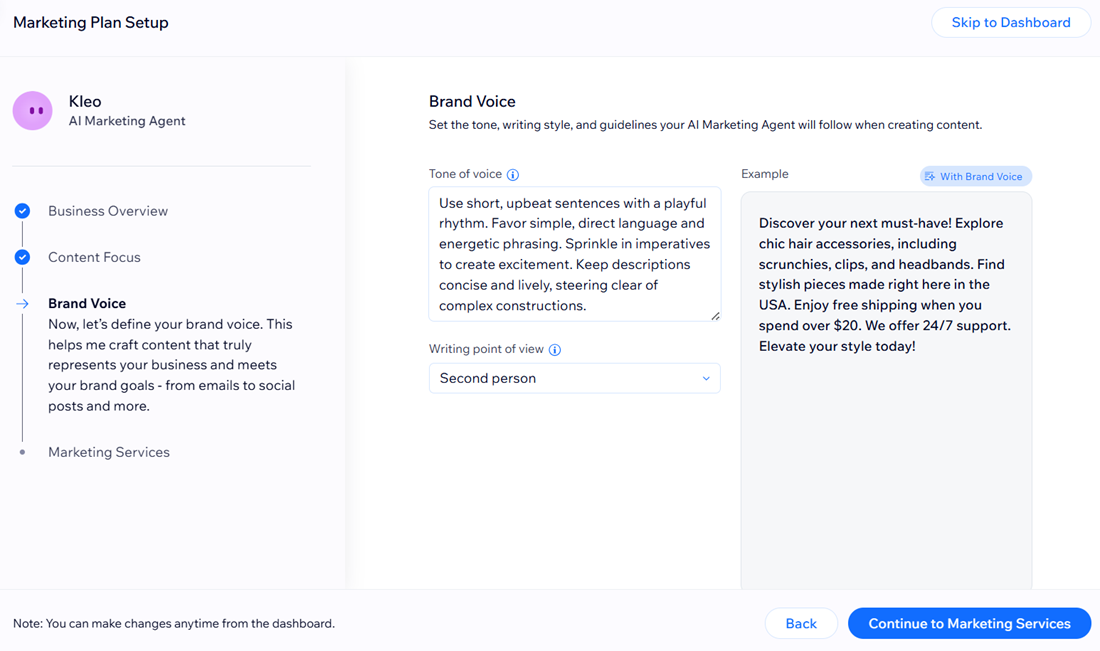
Tip: Preview how your content will look on the right. After making edits, click Regenerate for an updated sample. Toggle With Brand Voice/Without Brand Voice to compare how your descriptions affect the text.
Marketing Services
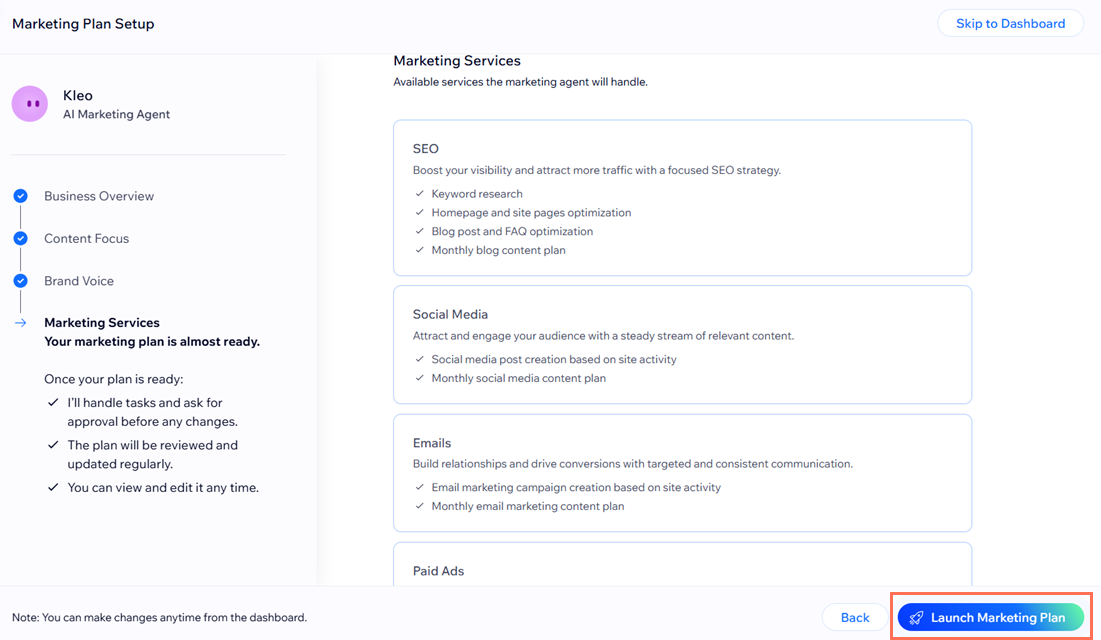
Kleo lets you know your marketing plan is almost ready and explains what happens next. Kleo will handle tasks and ask for your approval before any changes, the plan will be reviewed and updated regularly, and you can view and edit it any time.
Review the services Kleo will manage for you:
SEO: Keyword research, homepage and site pages optimization, blog post and FAQ optimization, plus a monthly content plan.
Social Media: Social media post creation based on site activity, plus a monthly content plan.
Emails: Email marketing campaign creation based on site activity, plus a monthly content plan.
Paid Ads: Smart Google Ads campaign creation and optimization.
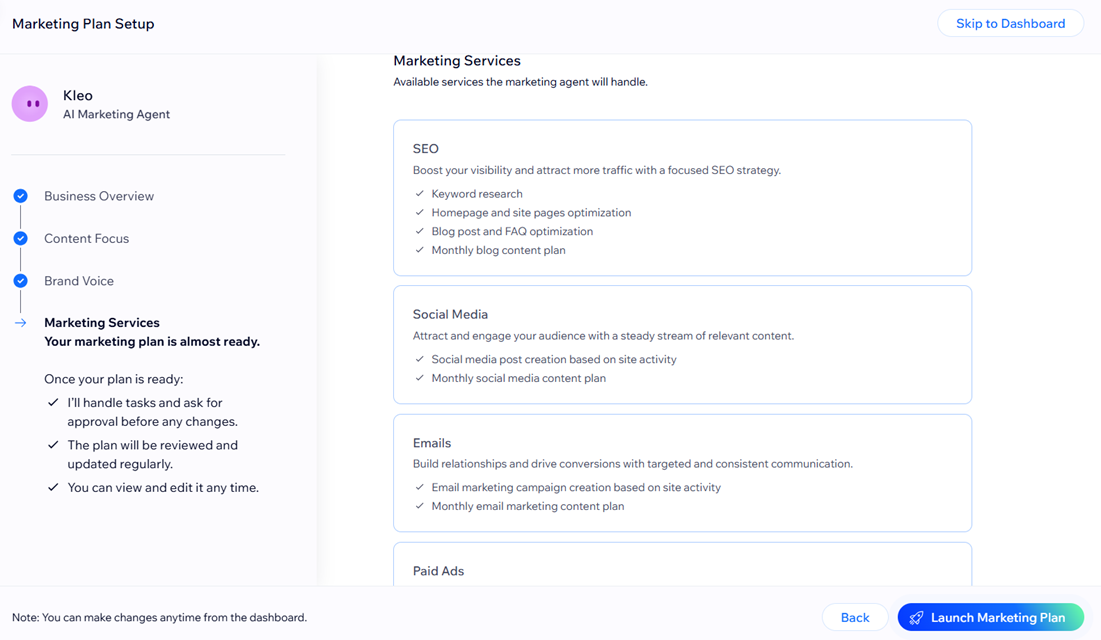
5. When you're ready, click Launc h Marketing Plan.
Tip:
Click Skip to Dashboard to get straight to the marketing agent dashboard without reviewing your business details and marketing services. This automatically enables all services, but you can choose to deactivate them in the dashboard.
Step 2 | Set up the AI Marketing Agent dashboard
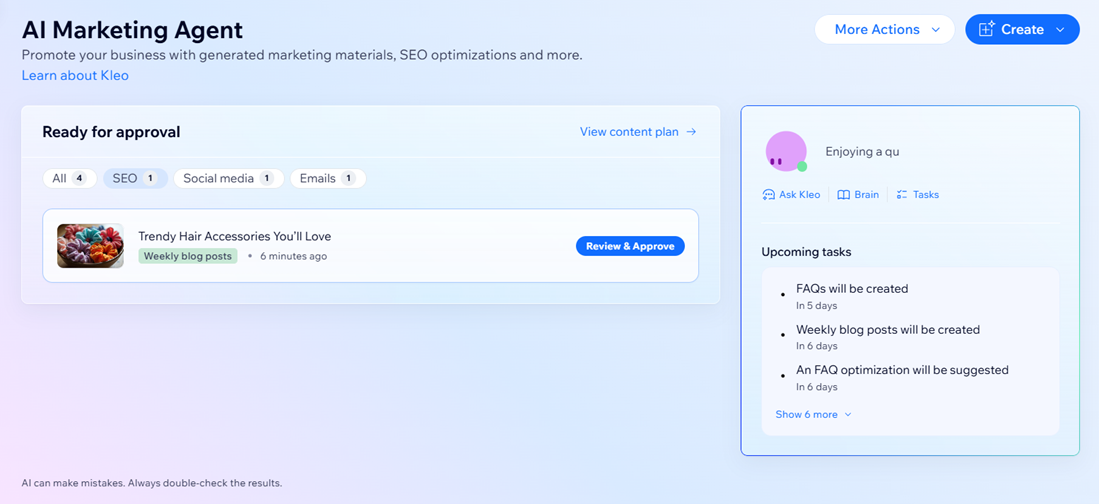
Once you're done onboarding the AI Marketing Agent, you're transferred to the dashboard. This is where you manage your marketing services, view tasks pending your approval, and more.
Some marketing services require you to complete all Action Needed tasks in order to activate the service:
SEO: Set your location, connect to Google Search Console, and turn on site indexing.
Social media marketing: Connect your social channels.
Email marketing: Verify your sender address and add subscribers.
Paid Ads: Create and launch a Google Ads campaign.
What's next?
Review and approve tasks, view your personalized marketing strategy and content plan, and chat with the AI marketing agent to get more information about your marketing efforts. Learn more about managing your tasks and marketing plan.
FAQs
Click a question below to learn more about the AI Marketing Agent.
Who can access the AI Marketing Agent dashboard?
All site owners and site admins can access the dashboard and make changes to any aspect of the marketing tools.
What tasks can the AI Marketing Agent help with?
The AI Marketing Agent automates many tasks that you may otherwise do manually and separately across the dashboard. It can assist with the following tasks:
SEO:
Conduct keyword research.
Optimize home page and main site pages.
Create a plan for generating and publishing blog posts.
Optimize blog posts.
Optimize FAQ questions.
Social Media:
Generate a social media content plan.
Create and share social posts based on an optimized weekly schedule.
Create and share social posts based on a certain event (e.g. when you create a new service or coupon).
Email Marketing:
Generate an email marketing campaign plan.
Create and send out email campaigns based on an optimized monthly schedule.
Create and send out email campaigns based on a certain event (e.g. when you create a new service or coupon).
Paid Ads:
Optimize targeted Google ad campaigns.
Tip: Learn more about the marketing strategy for each service in your Marketing Plan.
Can I customize the tasks the AI Marketing Agent generates?
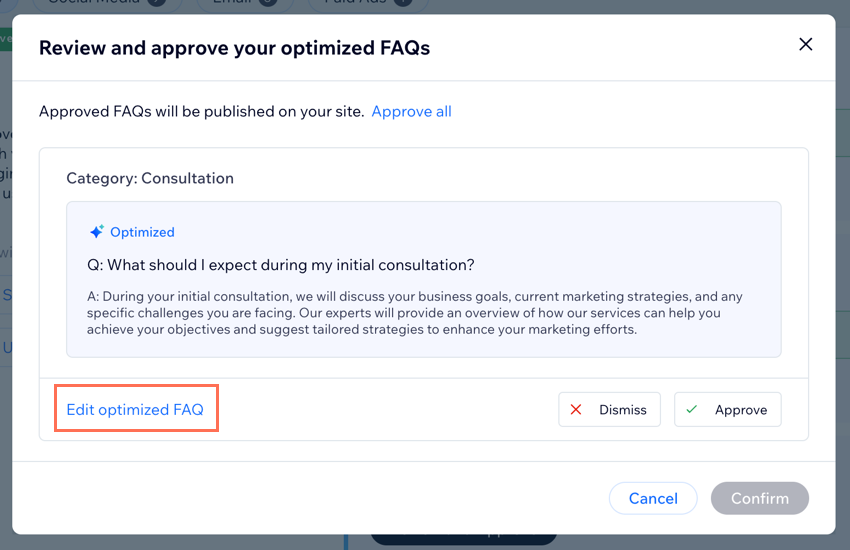
Yes, when you click Review & Approve in a task you have the option to edit the content before approving. You can proceed to save and publish the content from the relevant app's tab in the dashboard, or you can return to the AI Marketing Agent dashboard to review and approve all content.
Any changes you make in the relevant area are automatically reflected in the AI Marketing Agent dashboard. For example, if you edit a scheduled social media post in the Social Media Marketing tab, you'll see the post updated in the AI Marketing Agent dashboard.
Where can I see the planned content for blog posts, social media posts, and email campaigns?
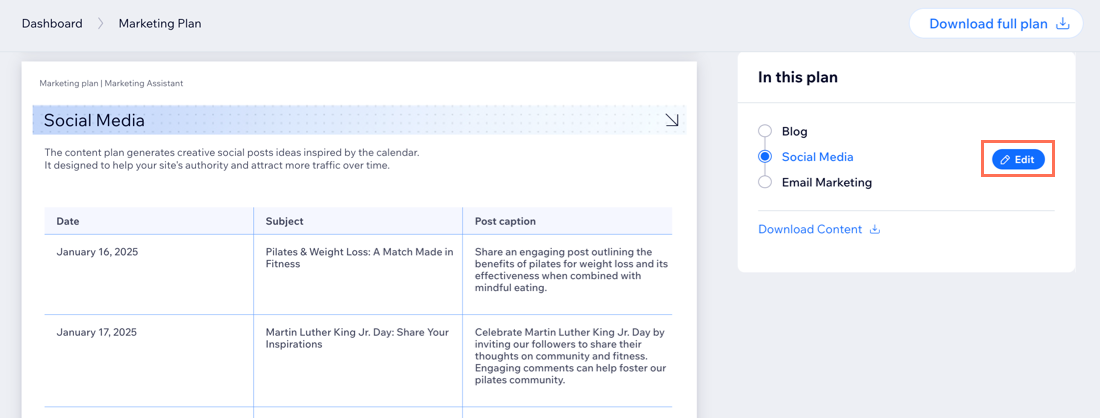
Click View Marketing Plan at the top right of the dashboard and click the Content Plan tab.
Tip: You can make changes to the generated date, subject, and post caption by clicking Edit next to a service.
How do I know when there's a task ready for my approval?
When there's a task ready to be approved by you, for example to approve a social media post or email marketing campaign, you'll receive an email notification and a mobile push notification.
Do I need to upgrade to use SEO, social media marketing, email marketing and paid ads?
It depends on the service. The use of SEO is completely free. You can use social media marketing and send email campaigns for free, with a limited quota. If you reach this quota (e.g., you publish 10 posts a month), you'll have to wait until the next month to resume usage or you can choose to upgrade the standalone plan.
Learn more about upgrading your standalone email marketing plan or standalone social media marketing plan.
Paid ads are not free. To use them, you need to create and fund a Google Ads campaign. Learn more about creating and managing your Google Ads campaign.
Note: AI credits are separate from social media and email marketing quotas. The AI Marketing Agent requires AI credits to generate content, while quotas determine how many posts or campaigns you can publish. Learn more about AI credits.
Can I deactivate the AI Marketing agent?
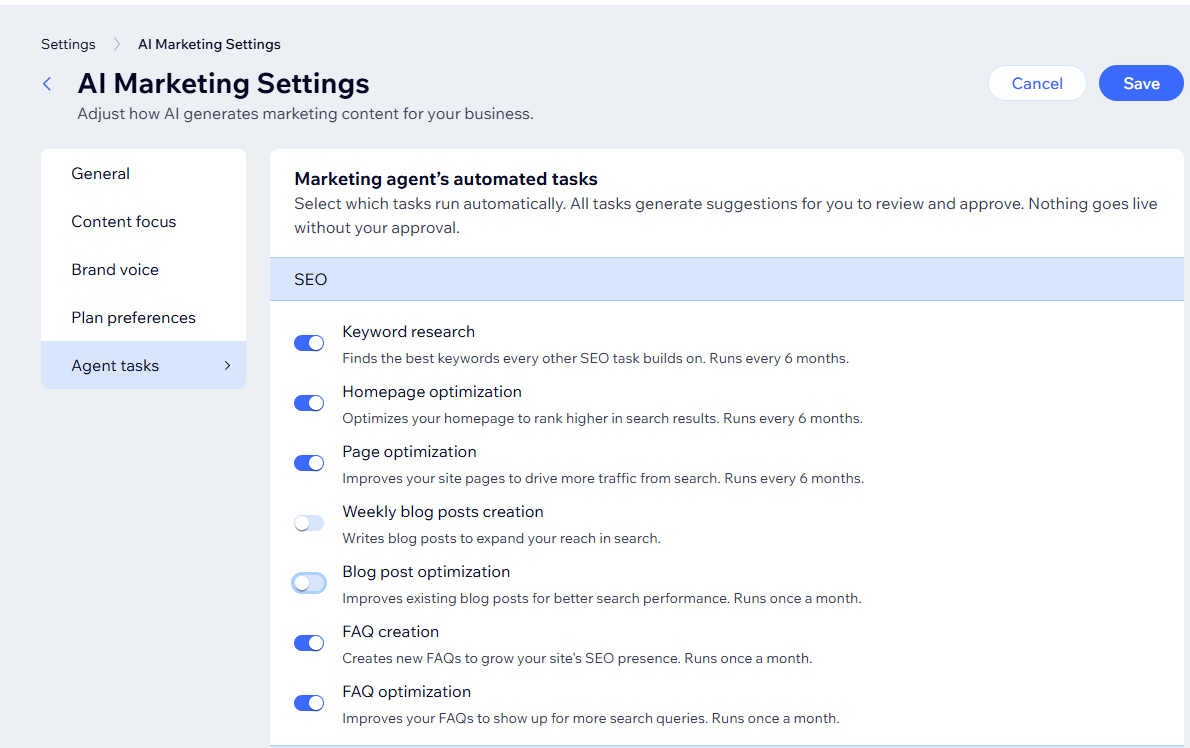
You can separately deactivate each service the AI Marketing Agent offers:
Go to Marketing Agent in your site's dashboard.
Click the More Actions dropdown.
Select Customize Kleo.
Select Agent Tasks on the left hand side of the popup.
Deactivate all the toggles necessary next to the marketing agent's automated tasks for SEO, Social Media, Email Marketing and Paid Ads.
Once you've deactivated them, click Save at the top right.
This article is credited to the Wix team - https://support.wix.com/ and we thank them for that!
