A Canonical Name (CNAME) record is a type of Domain Name System (DNS) record that maps an alias name to a true or canonical domain name. You can add or update your CNAME records from the Domains page of your Wix account.
Important:
If your domain is connected to Wix via pointing, you must add or update CNAME records with your domain host (not Wix).
To add or update a CNAME record:
Go to Domains in your Wix account.
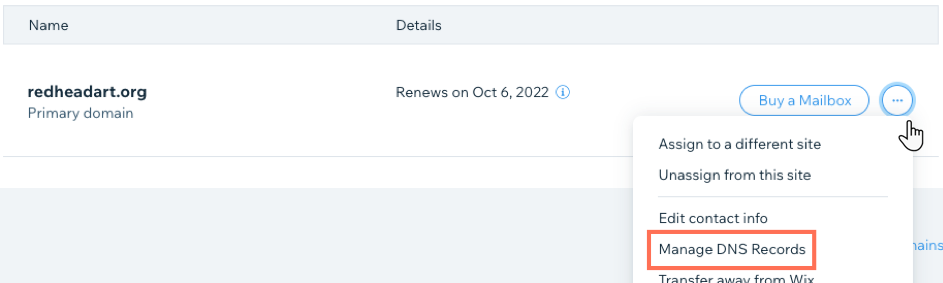
Click the Domain Actions icon

next to the relevant domain and select Manage DNS Records.
Add or update your domain's CNAME record:
Add a CNAME record
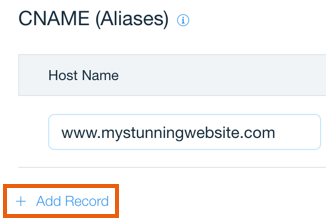
Click + Add Record in the CNAME (Aliases) section.
Click Got it in the pop-up message.
Click the Host Name field and enter a host name.
Click the Value field and enter the web address the record points to.
Click Save.
Click Save Changes in the pop-up message.
Update a CNAME record
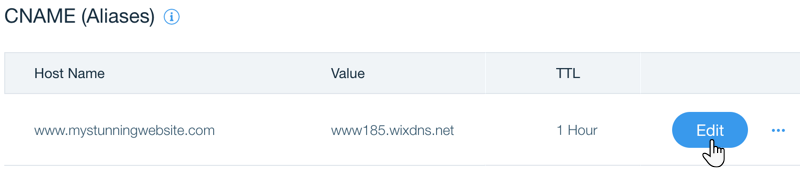
Hover over the CNAME record and click Edit.
Click Got it in the pop-up message.
Click the Host Name field and edit the host name.
Click the Value field and edit the web address the record points to.
Click Save.
Click Save Changes in the pop-up message.
This article is credited to the Wix team - https://support.wix.com/ and we thank them for that!
