Most of your data is accessible directly from your Wix account. This includes information about sites in your account, premium services, and personal information, such as your address and billing information.
Account information
Click to view instructions on how to access your account information.
Account settings
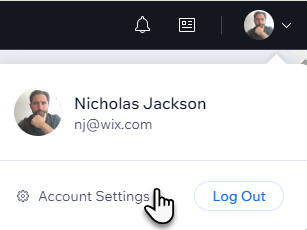
To access your account settings:
Hover over the user panel and click Account Settings.
All sites
This section includes all the current sites in your Wix account. Sign in to your Wix account to review your sites.
Tip: For Wix Studio users, switch between workspaces to locate the relevant site.
Chats, messages and other activity from your site visitors
In your Wix account you can review chats, form submissions, bookings, and all other activity from your site visitors.
To review your visitor activity:
Click Select Site on the site you wish to review.
Click the Inbox icon

at the top right.
Domains
In your Wix account you can review and manage all your domains that are managed through Wix. Go to Domains to review your domains.
Business email
In your Wix account you can review and manage all your personalized business email accounts. Go to Business Email to see your business email accounts.
Premium and Studio site plans
Go to Premium Subscriptions view your Wix site plans.
Invoices
You can review and download all of your Wix invoices directly from your Wix account.
To review your invoices for Wix services:
Go to Billing History in your Wix account.
Click the filters or use the search field to search for an invoice.
Click the More actions icon

next to the relevant service.
Click View Invoice.
Premium Subscriptions
Go to Premium Subscriptions to view all premium subscriptions purchased through Wix, including premium apps, logos, and more.
Media
You can review and manage all of the media that you've uploaded to your Wix and Wixel accounts. Select an option below to view your media:
Images:
Image files: Images that you uploaded to your site.
Secure images files: Images that you uploaded for apps using secure servers (e.g. Wix Art Store, Wix Photo Albums)
Wix Video cover images: Images that you used as covers in Wix Video.
Music:
Music files: Music files that you uploaded to your site (e.g. MP3 files).
Wix Music tracks: Music files that you uploaded to Wix Music.
Video:
Background videos: Videos that you uploaded for your site background.
Wix Video files: Videos that you uploaded in Wix Video.
Wix Video cover videos: Videos that you used as covers in Wix Video.
Other:
Flash files: Files that you uploaded in SWF format.
Shape files: Shapes that you uploaded to your site.
Document files: Documents that you uploaded to your site (e.g. PDF or DOC files).
Secure document files: Documents that you uploaded in apps using secure servers (e.g. Wix Art Store).
Font files: Fonts that you uploaded to your site.
Archive files: Files that you archived.
Secure archive files: Files that you archived in an app using a secure server (e.g. Wix Art Store).
Site information
Most of your site information can be accessed directly from your Wix account, such as your online store products, business location, employee information, etc.
Click to view features and apps that are accessible from your Wix site
Chats with your site visitors
Site contacts
Site properties
Invoices generated for your customers
Wix Stores
Wix Inbox
Bookings
Restaurants
Hotels
Blog
Forum
Photo Album
Pro Gallery
Art Store
Analytics and Insights
Wix Marketplace
Media manager
Wix Music
Wix Video
Marketing Integrations
Velo by Wix
Wix Mobile Apps
Wix Email Marketing
General Info
Apps made by Wix
Third Party Apps
And more!
Third party apps
Each app is unique and can be set up differently. Your information might be located in a different location, depending on the app. For example, some apps have a dashboard with your information, while other apps have a Settings panel in your editor.
Note:
To retrieve data from third party apps, contact the app owner directly.
Click to view instructions on accessing your apps:
Dashboard apps
Go to the dashboard of the relevant site.
Select the app you wish to view.
Editor apps
Go to your site editor.
Navigate to the page with the relevant app.
Select the app in your editor and then click Settings.
Trying to access data as a legacy contact?
Once Wix approves your request, ownership of the account transfers to you and you can review your site's contact, members, and customer data.
Learn how to request an account and download a data archive.
This article is credited to the Wix team - https://support.wix.com/ and we thank them for that!
