ICANN is introducing changes to how domain ownership is both presented and determined in the Registration Data Directory Services (RDDS) database.
Starting August 21, 2025:
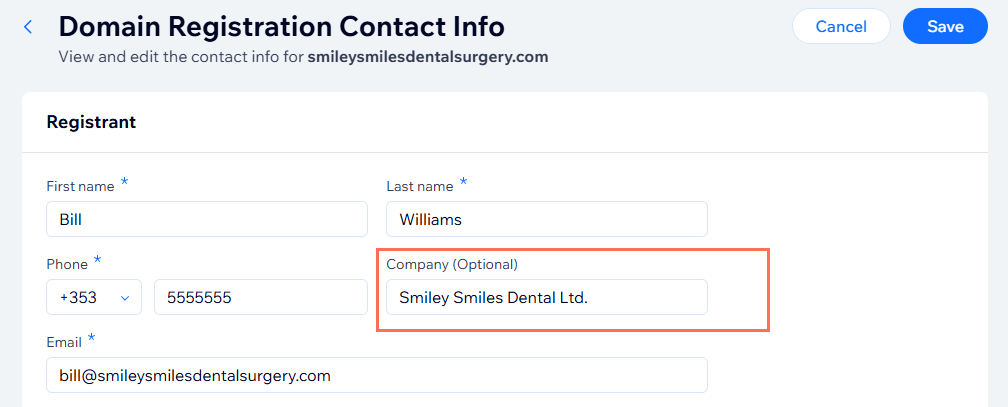
The Organization/Company name - as listed in the domain contact details - may be publicly displayed in the RDDS database.
The name listed in the Organization/Company field of your domain’s contact information will be recognized as the Registered Name Holder. This is the legal owner of the domain. If the Organization/Company field is empty, the individual listed in the RDDS database will be recognized as the Registered Name Holder.
Organizations and individuals should review and, if necessary, update their domain registration details to ensure ownership records are correct.
Go to ICANN Lookup to view your domain's current contact information.
FAQs
Click a question below to learn more about domain registration.
What is the Organization/Company field in domain contact details?
The Organization/Company field stores a business or company name for your domain. Starting August 2025, if entered, this name will determine who legally owns the domain.
Disputes over domain ownership will now reference the Organization/Company field first. Companies and individuals should review domain registration records to confirm the intended owner.
Can I leave the Organization/Company field blank to keep a domain personal?
Yes, if the Organization/Company field is left blank, the individual’s name in your domain registration contact details is listed as the legal owner.
Does updating the Organization/Company field temporarily lock my domain?
Yes, any changes to contact details trigger a mandatory 60-day lock before transfers or other changes can be made.
Will my individual information be shown in public ICANN Lookup (WHOIS) results?
No. Individual contact details remain private unless you explicitly opt in. However, company names appear publicly, if entered.
How do I update my domain contact information?
If Wix is your domai n host:
Go to Domains in your Wix account.
Click theDomain Actions icon

next to the relevant domain.
Click Edit contact info.
Note: If this option is missing, your domain was purchased elsewhere and you must contact your domain host to update the contact information.
Edit your contact information.
Click Save.
This article is credited to the Wix team - https://support.wix.com/ and we thank them for that!
